Updating to Lightroom 4.1 to gain RAW support for Olympus OM-D E-M5 – converting all your old presets

Written by Gary on May 30th, 2012

One of the never ending issues with buying a new camera is that you need the latest photo editing software to be able to deal with the new RAW file structures of the camera.

This applies to all of the latest cameras although arguably there is less of an issue with those cameras which use the Adobe DNG RAW format.

The Olympus OM-D E-M5 is no exception to this, to process the RAW files in Adobe Lightroom, you need Lightroom v4.1 or later – at present there is only a release candidate available but it seems to work well.

Adobe Lightroom v4.x adds a few nice new features to Lightroom v3.x but it also means that by default your old presets no longer give the same results if they alter the following parameters

  • Exposure
  • Brightness
  • Contrast
  • Fill Light
  • Highlight Recovery
  • Black Clipping
  • Clarity
  • Tone Curve

That’s the BAD news, now the good news – you can have the presets working in Lightroom v4.x if in the Developer mode you scroll down to the Camera Calibration section and set Process to 2010.

Unfortunately, you will need to do that every time you want these old presets to work.

You have 2 options to manage this annoying problem:

  1. create a new preset with the process 2010 saved into the preset so Lightroom always reverts to 2010 format when using the preset
  2. try to re-create the appearance of the old preset in process 2012 then save as a new 2012 preset (this will of course no longer work in earlier versions of Lightroom)

The 1st option is simplest by far:

  • open any image in Developer mode
  • apply the preset
  • set process to 2010
  • press the + icon at the top of the list of presets to save your new preset – ensure all parameters used by the preset are ticked in the dialog box
  • you can now delete the old preset

The downside to using process 2010 is that you will not be able to add further adjustments using process 2012 parameters, but you can still use new features such as the gradient tool.

The downside to converting them to process 2012 is that it will take a lot of trial and error to find new settings to match the old ones.

If you don’t upgrade, you can still use older versions to process your jpegs, but note, that by default, Lightroom will not import jpegs if it finds a similarly named RAW file, to enable this, you need to go to Edit:Preferences then under General there is a section “Import Options” – just tick the “Treat jpeg files next to RAW files as separate photos”


The Olympus OM-D E-M5 with 12mm lens makes hand held urban street shots at night easier and more enjoyable with more security

Written by Gary on May 27th, 2012

Last week I went on a road trip to outback Australia to play with my new Olympus OM-D E-M5 Micro Four Thirds camera and primarily used it with the lovely but moderately expensive Olympus m.Zuiko Digital 12mm f/2.0 lens.

I love walking the streets at night to take urban street scenes at night when they have a totally different character, but carrying a tripod and a big camera when you are by yourself is just asking for trouble!

The Olympus OM-D E-M5 camera with the Olympus 12mm lens is small enough to easily fit in a jacket pocket so you can be discrete and hide it when there is potential for trouble, furthermore it means you can still go into a pub for a drink and not draw attention to yourself.

This combination allows you to easily do fun night shots as the image stabilisation combined with the 12mm f/2.0 lens, EVF so you can still see your subject in the dark, fast AF in the dark, adequate DOF for street landscapes even at wide apertures, and high image quality at ISO 1600 breaks barriers that no other system can match for hand held shots at night of static subjects, easily beating my Canon 1D Mark III pro dSLR for this purpose.

You can hand hold this lens down to shutter speeds of even a half a second if you are very careful, although I would recommend you try to limit yourself to 1/4 or 1/6th second to get more reliably sharp photos.

At f/2.0 or f/2.8 and ISO 1600 at 1/4 sec you can get into some quite dark environments and take successful shots, plus the slow shutter speed allows you to add some motion blurring effects if need be.

Here is a typical hand held shot walking around the remote outback mining town that is Broken Hill – which I think is actually quite a lot safer than Melbourne at night but still, I wouldn’t want to push my luck!

a Broken Hill pub at night

This is essentially straight from the camera (although converted to B&W, cropped and resized for the web in Lightroom).

Shot details: Olympus 12mm f/2.0 lens at f/2.0 with ISO 800 and shutter 1/20th sec hand held.

I have also posted these earlier related blog posts:

This combination makes an awesome, compact, high image quality, versatile travel photography kit, just add in a walkabout zoom lens and a 45mm f/1.8 portrait lens, and you are set!


False color infrared photography with the Olympus OM-D E-M5 Micro Four Thirds camera

Written by Gary on May 24th, 2012

Last week I went on a road trip to outback Australia to play with my new Olympus OM-D E-M5 Micro Four Thirds camera and primarily used it with the lovely but moderately expensive Olympus m.Zuiko Digital 12mm f/2.0 lens.

In my last post, I showed how the E-M5 makes B&W infrared photography easy.

This post is to demonstrate a limited false color tehnique if all you have is Lightroom.

Normally to get a false colour infrared image from infrared RAW file, one would swap the red and blue channels, but unfortunately, Adobe Lightroom does not have this functionality.

In this image I have used Lightroom to adjust White Balance to the far left (blue) and then adjust the tint then correct the exposure as we are no longer relying only on the red channel as I did in the B&W IR shots.

Silverton, near Broken Hill in outback NSW, Australia:

False color IR Silverton

ISO 200, 12mm lens at f/2.0, 1/13th sec hand held.


The Olympus OM-D E-M5 makes hand held infrared photography easier

Written by Gary on May 23rd, 2012

Last week I went on a road trip to outback Australia to play with my new Olympus OM-D E-M5 Micro Four Thirds camera and primarily used it with the lovely but moderately expensive Olympus m.Zuiko Digital 12mm f/2.0 lens.

I love infrared photography and use a Hoya R72 infrared filter as my main IR filter.

This article is NOT about using a modified camera with IR blocking filter removed but an E-M5 straight from the retailer.

Unfortunately, using an optical viewfinder as on dSLRs makes hand held use almost impossible as the filter is so dark there is little that can be seen through it unless pointed at the brightest of scenes.

Furthermore, the reduction in light requires either long exposures or high ISO, even with wide aperture f/2.0 lenses.

I was just able to achieve reasonable hand held IR shots with my Panasonic GH-1 combined with the Panasonic Leica-D 25mm f/1.4 lens at f/1.4 in bright sunlight, but the amazing E-M5 takes IR even further thanks to its built-in image stabilisation system, and much better image quality at high ISO.

Hand held infrared with the E-M5 becomes a fun enjoyable experience as long as you have a relatively bright scene, a Hoya R72 filter and a f/2.8 or wider aperture lens.

So let’s see what can be done in the bright sun in outback Australia with its blue skies (although unfortunately, few trees to show off the Wood’s effects):

IR Silverton Hotel
This is essentially straight from the camera (although cropped in Lightroom a touch).

Shot details: Olympus 12mm f/2.0 lens at f/2.8 with ISO 400 and shutter 1/8th sec hand held.

Broken Hill sculptures at sunset:

IR Broken Hill sculptures at sunset

The above shot was with Olympus 12mm f/2.0 lens at f/2.8 with ISO 400 and shutter 1/6th sec hand held and was processed in Lightoom with split toning to provide the sunset tones instead of B&W.

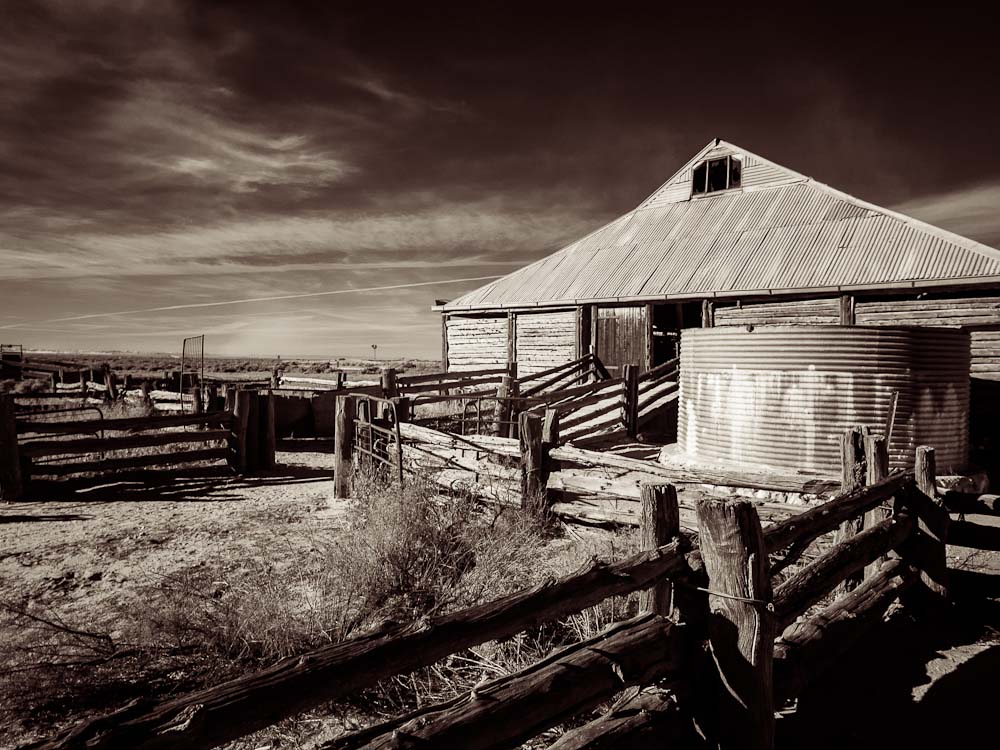
Shearing shed on shores of the fossilised 18,000 year dry Lake Mungo:

IR shearing shed on shores of the fossilised 18,000 year dry Lake Mungo

The above shot is my favorite, and one of the few times during the week that there was actually some clouds in the sky.

It was shot with Olympus 12mm f/2.0 lens at f/4 with ISO 400 and shutter 1/5th sec hand held and was processed in Lightoom with split toning to provide the sepia-like toning instead of B&W.

Setting up the Olympus E-M5 for B&W IR shots straight from the camera:

  • set Picture Mode to Monotone with Contrast +2 (I like contrasty IR shots), and B&W filter to Red. Of course you can play with these further and add Pict. Tone of Sepia instead of Neutral.
  • set ISO to 200-400 for sunny scenes
  • set exposure mode to aperture priority and choose a wide aperture to give a fast enough shutter speed (remember the 12mm lens on the E-M5 you could use even down to half a second with care hand held!) but sufficient depth of field (eg. f/2.8)
  • ensure IS is set to IS1
  • adjust exposure compensation so that you minimise blown out highlights as these tend to create hot spots from IR flare within the lens (I often use minus 0.5 to minus 0.7)
  • place the IR filter on the lens
  • you can easily compose and autofocus even with the IR filter in place – just awesome!
 

The Olympus OM-D E-M5 makes astrophotography easier

Written by Gary on May 23rd, 2012

Last week I went on a road trip to outback Australia to play with my new Olympus OM-D E-M5 Micro Four Thirds camera and primarily used it with the lovely but moderately expensive Olympus m.Zuiko Digital 12mm f/2.0 lens.

Part of camping out in the beautiful night skies of the remote regions of Australia well away from light pollution of the cities is to just lie back and observe the myriad stars while waiting for meteors – fantastic in the desert regions in May where there are no mosquitoes to annoy you and the night is not yet too cold as to be uncomfortable.

What better time to see how this amazing camera can make astrophotography easier.

Unfortunately, I did not bring my telescope mount to provide guided long exposures and so had to limit myself to tripod mounted long exposures.

How does the E-M5 make life easier for astrophotography?

  1. no mirror, so no need to remember to set mirror lockup to prevent camera shake
  2. no mirror, so live view is easy to use
  3. flip out LCD avoids having to strain looking at awkward angles, particularly when shooting straight upwards
  4. AF is good enough to AF on bright stars as long as the sky is dark and offering good contrast and you have a wide aperture lens such as f/2.0
  5. touch LCD can be set to AF only thus makes it easier to AF on a bright star instead of having to manually move the AF region onto the star
  6. magnified manual focus is easy to use if AF does not work
  7. can set Live Boost ON to make it easier to see the fainter stars on the LCD
  8. can use Live BULB so that they can see the image forming during long exposures – very handy to check that you have the composition correct and abort the exposure if it isn’t instead of waiting a full 1-2 minutes to find out
  9. NR ON automatically performs a dark frame subtraction for long exposures
  10. ISO 1600 is VERY usable
  11. timed shutter speeds extend to 60secs in manual mode (most cameras only go to 30secs which is inadequate for most astrophotography)
  12. can set a timed limit to BULB and Live TIME of 1, 2, 4, 8, 15, 20, 25, or 30 minutes – very few cameras have this feature
  13. camera is light so that mounting it on telescopes causes less issues with weight balancing compared to a full frame dSLR
  14. can use a remote cable and set drive mode to continuous and AntiShock to the interval between exposures to work as an intervalometer
  15. can attach a TriggerTrap cable and use your iPod or iPhone to control intervalometer aspects
  16. can use almost any lens ever made (via adapters) as well as direct attachment to eyepiece of telescopes (via M43-T2 adapters)

One of the holy grails of astrophotographers is to find a wide angle lens that captures stars as points instead of with the usual spherocoma and astigmatism aberrations which are a characteristic of nearly all wide angle lenses.

My main aspiration of this test was to see how the AF and MF worked as well as to determine if the Olympus 12mm f/2.0 would perform in this very demanding domain.

During my trip I found the Olympus 12mm to be superb for most of my needs such as hand held infrared photography, hand held urban night street scenes, and general travel photography but like nearly every other wide angle lens ever made, it too was not optimised for astrophotography and the over-exposed brighter stars had the very annoying coma and astigmatism with purple CA in the coma aberration:

Milky Way with Southern Cross and Centaurus on top right and Scorpius bottom left: Olympus 12mm at f/2.0 ISO 1600 20 secs (click for larger view):
Milky Way 12mm at f/2.0 ISO 1600 20secs
Note that I did play with contrast a bit on this image but I did not do any CA correction.

So as lovely as this lens is, and with the very nice switchable manual focus controls, it is a useful but not brilliant, astrophotography lens.

Full frame astrophotographers generally resort to expensive wide angle lenses such as the Zeiss 21mm f/2.8, although I have heard the Samyang/Rokinon 14mm f/2.8 does an admirable job and is very cheap in comparison, so this lens may be the answer for Micro Four Thirds users needing a wider angle than a Panasonic Leica-D 25mm f/1.4.

I also briefly tested the Olympus m.ZD 45mm f/1.8 lens and this performed better but still had CA around the bright stars and there was some coma and astigmatism in the corners. Unfortunately, the focal length of this lens means tripod mounted images are restricted to about 8-10secs to avoid obvious star trailing.

For those who are interested, THIS LINK will open a full jpeg straight from camera of a dark frame at room temperature (~16degC) from the E-M5 taken at ISO 1600 and 60secs exposure with no dark frame subtratction (NR = OFF) and Noise Filter = LOW.

Now I will be even better prepared for the next bright comet that comes our way, here is a manually guided image of Comet McNaught I took with an Olympus E330 and an Olympus OM 50mm lens in January 2007:

Comet McNaught


A very quick night street shot as I walked across the road and an ambulance started bearing down on me

Written by Gary on May 5th, 2012

Just to show how responsive and fantastic this Olympus OM-D E-M5 Micro Four Thirds camera is with the Olympus m.ZD 12mm f/2.0 lens on, here is a shot as I was crossing a busy Melbourne intersection with camera in hand.

I had a split second to compose, AF, get the shot and get out of the way as the ambulance with lights and sirens on started to head my way.

The ONLY processing this image has had is in Lightroom 4.1 on the RAW file which was rotated a touch, cropped and then exported as web size with compression and default Lightroom sharpneing for the web.

It was taken at ISO 320, 1/60th second at f/2.0 with autoWB, noise level at low, Picture Style = Natural with default settings.

Obviously no tripod, but I was walking and had an umbrella in my left hand so I was not holding it carefully – indeed not carefully enough that I had to rotate the image!

But still it is very sharp indeed given the situation!

Click on it for larger view.
Melbourne at night on the move


Pushing the flash sync of the Olympus OM-D E-M5 Micro Four Thirds camera

Written by Gary on May 4th, 2012

The new Olympus OM-D E-M5 Micro Four Thirds camera is great for lots of reasons, but one of them is that it has easily the BEST flash capabilities of ANY Micro Four Thirds camera, or for that matter, ANY mirrorless camera currently available.

Unlike the Panasonic cameras prior to the GH-3, it has remote TTL flash capability, much better control over manual flash output, the TTL flash metering appears to work perfectly with legacy lenses, you can over-ride the flash sync speed* and the flash sync with new flashes is a lovely 1/250th second.

The Fuji X-Pro1 with its lovely sensor only has flash sync of 1/180th sec, no remote TTL flash system as I understand it, and has major trouble with autofocus or manual focus in low light conditions where you would be most needing flash, and of course, no image stabilisation on any of the only 3 lenses available.

The Sony NEX cameras persist with Sony/Minolta proprietary hot shoe which is not compatible with every other manual hotshoe ever made, and flash sync only 1/160th sec.

The Samsung NX cameras have flash sync of 1/180th second, but no remote TTL flash that I am aware of.

Most of the EM-5 features also exist on the current Olympus PEN cameras except the nice fast flash sync of 1/250th second.

Another benefit of the identical Micro Four Thirds and Four Thirds hotshoe pin layout is that they can both use the Canon off-camera TTL cord as this is TTL pin compatible for use as a off-camera TTL cord to an OLympus flash unit – fantastic if you also happen to use Canon gear as I do!

But being who I am, I like to see what happens when I push the system, because sometimes you want full output flash at faster shutter speeds (not just Super FP or HSS flash which saps your flash output dramatically as you increase shutter speed!).

On the Panasonic GH-1 there was no way I could push it like I have always been able to do on my Olympus dSLRs, and now with the E-M5 – by using a manual flash only adapter in the hotshoe which then connects to your flash in non-TTL mode, you can trick the camera software to allow any shutter speed not just a shutter speed up to the “flash sync”.

The downside, is that as you increase the shutter speed, you get increasing vignetting along the top of the frame from the flash exposure due to the mechanical focal plane shutter obscuring the sensor during the flash exposure.

However, if you are shooting a portrait outdoors in the sun with camera rotated into vertical portrait mode, and you position your subject to the opposite side of where the vignetting is occuring (and preferably have no close objects which will only be partly lit by the flash, as this would betray our little trick and spoil the photo), you can succesfully use this technique very nicely indeed to get results that are otherwise not possible.

So here are the test shots of a wall to demonstrate the increasing vignetting when using an Olympus FL-36R flash:

1/250th sec
1/250th sec (above)

1/320th sec
1/320th sec

1/400th sec
1/400th sec

1/500th sec
1/500th sec

The hotshoe adapter could also be a non-TTL radio trigger device, or a MiniTTL PocketWizard set to non-propietary mode which ignores the TTL pins.

The main reason for doing this is to effectively make your flash more powerful when trying to use it in bright sunlight as a fill in flash, and at the same time, the faster shutter speed allows wider apertures for your portraits, although you will almost certainly still need to use a ND or at least a polarising filter to further assist in getting a wide aperture in bright sunlight at ISO 200.

Food for thought.


The incredible Olympus OM-D E-M5’s hand held low light performance plus a high image quality wearable camera system! No more back pack, good bye tripod!

Written by Gary on May 4th, 2012

Today was the 1st day I had the opportunity to take my new Olympus OM-D E-M5 Micro Four Thirds camera for a walk in the city.

It was a heavily overcast, wet day, and I decided I would catch the train in, leave my backpack at home, and carry my camera kit in my jacket pockets as well as carry a full size umbrella, just to see how it would go.

I took the E-M5, Olympus 12mm f/2.0, 17mm f/2.8 pancake, and 45mm f/1.8 lenses (I can’t wait until the 75mm f/1.8 comes out in about July!).

I could easily have also taken the Olympus 14-42mm collapsible kit lens in another pocket, they are all so light and compact.

I must say, this was the 1st time, I have been able to carry 3 lenses and such a high quality camera with me in my jacket pockets and would-be assailants would be none the wiser!

I have just downloaded Lightroom 4.1 RC so I could play with the Olympus RAW files, and being late at night now, I decided just to upload one untouched file other than being opened in Lightroom and resized and compressed for the web, and this is the one below top demonstrate how fantastic the hand holdable low light capabilities of this camera.

For this shot it was about 3 hours AFTER sunset, in the middle of a very dark alley, looking through my 12mm f/2.0 lens in the EVF the image was dark as the light levels were BELOW what the EVF is designed for (I didn’t put the Live Boost on, nor resort to iAUTO, both of which would have made the EVF brighter). The wall was lit by a distant lamp.

I was hand holding the camera at the end of a cold walk in the night air (~10degC), and the camera had no problems rapidly autofocusing on the graffiti on the wall even though it was so dark (I have the AF illuminator OFF as well !!).

So here is the untouched shot to give an idea of how sharp it is at f/2.0, ISO 800 and exposure 1/2 a second hand held – yes you read correctly half a sec hand held!!

Of course, I could have bumped ISO to 1600 and allowed a more reliable 1/4 sec exposure, but here is my one and only attempt at half a second on this shot before I caught the train home:

WARNING: this photo is NOT meant to have any artistic or photographic merit other than to show half-second hand held photos ARE possible!

12mm hand held at half sec exposure
When you can hand hold shots at 1/3rd a second reasonably reliably, it means you can get reasonable night street shots with moving headlights, as well as being able to do moving water shots such as waterfalls in case you forget your tripod.

For hand holdable low light wide angle at 24mm focal length in 35mm terms with AF, you just can’t do this with a Nikon or Canon cropped sensor dSLR to this degree and for this price.

For a start neither Canon nor Nikon make a 24mm equivalent prime lens for their cropped sensor dSLRs so you have to go for a zoom lens at f/4 (f/2.8 if you go Sigma), or the super expensive 14mm f/2.8 pro lens would be the closest prime, and in neither situation do you have image stabilisation.

And don’t even think about even putting the lens in your jacket pocket let alone a camera and 3 lenses.

When I was walking around and it was lightly raining, I just turned the camera with the lens downwards as these lenses are not weatherproof like the E-M5.

I just wish Olympus did not follow Canon’s lead and put a stupid ON/OFF switch at bottom rear of the camera, as I had to use 2 hands to turn it on, while for the most part I could just walk around and control everything with my right hand while my left hand held the umbrella up.

The other tricky time is trying to change lenses in the wet, it would be nice to have a 3rd hand as I was always worried I might drop one of the 3 items I was juggling.

Wouldn’t it be nice if Olympus made all these components TOUGH like their compact camera series!!

Very happy indeed so far with this camera.

It has its foibles but it is such an amazing camera for its size and the lenses are just so lovely, and the AF so fast, the foibles are insignificant in comparison.


Finally!! I have managed to buy the awesome Olympus OM-D E-M5 Micro Four Thirds – so let’s see how I configure it

Written by Gary on April 28th, 2012

Forgive me for I have sinned as I have been without a Micro Four Thirds camera for over 3 months now since my beloved Panasonic GH-1 with its lovely 20mm f/1.7 lens was stolen from me.

I have been waiting in purgatory an endless time having to resort to using my gigantic, heavy Canon 1D Mark III dSLR all this time whilst salivating over the news that at last we have an Olympus Micro Four Thirds camera that has so many great features and ticks all of the important boxes for what an enthusiast photography would like, and now I have managed to find one available in a shop today.

If you want all the features and reviews of this awesome camera, check out my wiki resource here.

It is a very deceptive camera, tiny but with awesome image quality even at ISO 1600 and above, super fast AF with super easy just touch the screen on the subject you want in focus and almost instantaneously, focus is achieved and the picture taken before your subject knows what has happened and if configured with AF beep off,  almost silently.

But despite this apparent simplicity, it has loads of awesome functionality for which you will need to read the electronic manual to get the most out of (not the hard copy which has almost no information in it).

If you have ever watched videos of the very funny Kai trying to use the E-M5 with its default settings, you will understand why he gets frustrated with it, particularly with its choice of subject to AF on.

This little blog is my step #1 into how I would configure this incredible camera so that YOU can take control.

Charge the battery for the mandatory 3 hours 1st charge – this is best practice for lithium ion batteries.

Turn the camera on with the lever at the rear bottom right (yes, for some reason, presumably lack of space, Olympus has followed the Canon example here which is a bit annoying).

You will note that it will automatically switch between the rear LCD screen and the electronic viewfinder if you place the camera to your eye or accidentally put your hand bear the EVF’s proximity sensors. This functionality can be turned off, and indeed if I was at a conference or a concert, I would turn the rear screen off totally to avoid distracting others. Pressing the INFO button repeatedly determines what is displayed on the rear screen, including nothing as an option.

Firstly, let’s get our focus system optimised!

On the top right of the camera, you have 2 dials which by default control shutter speed, aperture, and exposure compensation depending on which PASM mode you are in, and for zooming in on the image in playback or magnified view modes – I would leave these defaults as they are.

Near these dials there are two customisable function buttons, Fn1 and Fn2, by default Fn 1 is set to AEL/AFL lock and Fn 2 is set to multi-function (each function is selectable after holding it down and turning a dial), again, I would leave these as they are BUT we will change a menu option so that in MF mode, the Fn 1 button activates AFL ONLY and not AEL which is the annoying default.

To set this, go to Menu by pressing the Menu button, select Custom Menu (the cog wheels icon), select AF/MF then AEL/AFL then for MF set mode 3, and this will mean half-down shutter will lock exposure while AEL/AFL functionality which we have left assigned to Fn 1 button with activate AF briefly then lock the AF.

While you are in the Custom Menu system (see Disp/PC sub menu, Beep icon), you may want to turn the AF Beep noise OFF – just look for the green AF confirmation light instead, it will be much less distracting for others and your subject.

This is a brilliant way to set focus and far less frustrating – just leave AF/MF mode for Still Picture in MF and you have a great hybrid system just like most professionals use.

Now let’s instruct the camera how WE want it to auto focus instead of having it select random objects.

While still in the AF/MF part of the menu system, ensure Full-time AF is OFF (we don’t want the camera continuous hunting for things to AF on when we are not even taking a photo), AEL/AFL should now be S1/C2/M3, MF Assist set to ON (as we want the magnification assist to be activated as soon as we start turning the manul focus ring on the lens), AF Illumination set to OFF (this is really distracting for subjects, and this camera works pretty well in low light without it if you use wide aperture lenses), Face Priority set to AF on near eye if doing a single person portrait (some may prefer to turn this off but it seems such a cool feature for portraiture).

So far so good, but it is still going to AF on a random subject, so let’s fix this by reducing the AF area to JUST the central square, then YOU can CHOOSE the subject by composing the scene with your desired subject in the centre, lock AF with Fn 1 button then re-compose (if you want to swap to touch screen AF or half-press shutter AFL, just set AF mode to S-AF instead of MF).

To change AF selection to ONLY the centre square, in photo mode, press are rear arrow button, and this will display the AF area grid. Press INFO button and this allows you to select Face Detect mode via left/right arrow buttons (we have already done this via the menu system earlier so can ignore here), and the size of the AF region which is adjusted with the up/down arrow buttons – use the down arrow to get to just one AF region, and ensure this region is in the centre by again pressing INFO button to leave that mode so you can use the arrow buttons to move the AF area around.

Now to optimise manual focus ease of use:

As mentioned above, ensure MF Assist set to ON (as we want the magnification assist to be activated as soon as we start turning the manual focus ring on the lens).

But what if we are using a legacy lens where moving the manual focus ring cannot activate the magnified mode?

Simple, the Fn2 button is left in Magnify mode (hold it down to select this), press it twice and you are in Magnify mode.

Let’s enable the shutter release to activate IS to help us focus more accurately. In the Custom Menu, go to Release, then set Half Way Rls With IS = ON, this will mean that if you are trying to do manual focus with magnified view, you can half-press the shutter release and the image stabilisation will become activated making it MUCH easier to gain accurate manual focus, especially with telephoto lenses – very cool indeed. If you don’t shoot much manual focus, you can leave this to be set OFF.

The IS works fine in magnified view mode activated by turning the manual focus ring BUT on a legacy lens, when we half-press the shutter button to activate IS, we now lose Magnify mode – let’s fix this by setting LV Close Up Mode to mode 2 (this is under Custom Menu, Disp/PC).

If you want to swap between AF and MF modes quickly in case you want to use the touch screen AF rather than the Fn1 button to AF, then assign a button to MF toggle – perhaps the REC button if you do not intend doing movies, or if you are not using legacy lenses, then assign it to Fn2 button where it works very well indeed as a toggle. Of course, this can be also done via the Super Control Panel but that is more cumbersome.

No wonder Kai couldn’t get focus working well, it is such a complex business 🙂

Now let’s optimise our image quality.

Olympus cameras are well known for their superb out-of-camera jpeg colours, so most of us can leave the default Picture Mode to Natural (although using Vivid can speed up the AF even further as it gives more contrast!), but Olympus cameras are also known for their heavy handedness in applying noise filter and sharpening, so I prefer to set Noise Filter to LOW (in Custom Menu, Color/WB menu BUT leave Noise Reduction to Auto as this is needed for long exposures) and you may also want to reduce Sharpening  within the Picture Mode menu.

For some reason, Olympus in their wisdom has set the white balance to display warmer than normal colours, you may wish to turn this OFF via the menu item under Custom Menu, Color/WB WB Auto Keep Warm Color = OFF.

Unless you are shooting low light action shots where you need a fast shutter speed and a very high ISO, set Custom Menu, Exp/ISO, ISO-Auto Set, High Limit to 800 instead of 1600 or 3200, after all hopefully you are using the nice fast, wide aperture lenses, and you have the world’s best image stabilisation system on board! But if you need it, ISO 1600 is still very good image quality on this camera, and if it stops subject blur then it is worth it’s weight in gold!

Shoot in RAW + jpeg. Olympus by default has set the camera to only give you jpegs, that’s fine when you are just playing with it, but when you get down to taking your memorable shots, make sure you get them in RAW too!! RAW gives you the best image quality when it comes to playing around in Lightroom, etc to change white balance adjust contrast, etc.

Wow, that is a hell of a lot to change from the defaults, and we have only just touched the surface of what options are available with this machine!

Now for some initial observations:

The shutter is much, much more quieter than my Canon 1D Mark III dSLR, and it shoots just as fast at 9-10fps depending upon your SD card speed – sure AF is only on the 1st shot at this speed but then my Canon doesn’t do a great job at continuous AF anyway.

Did I mention that the AF was incredibly FAST!

I cannot seem to work out how to only playback images via the EVF instead of the rear screen like I could do with my Panasonic GH-1 – I love this as people around you hate you distracting them at conferences or concerts at night by chimping at your images on the bright rear LCD screen – hopefully someone can tell me how, and if not possible, hopefully Olympus adds this in a future firmware update. This is also very important to me as I need reading glasses to look at the rear LCD screen but I don’t need glasses looking through the EVF, so I would really, really love to be able to playback images through the EVF.

My Olympus FL-36R flash will automatically set shutter speed to flash sync 1/200th sec (you need the new flashes to sync at 1/250th sec), but if you put the flash onto a hotshoe adapter which does not pass through the TTL pins, you can use any shutter speed you like without resorting to the output draining SuperFP mode, but you obviously lose TTL exposure and as the shutter speed increases from 1/250th sec, you get increasing vignetting across the TOP of your image such that by 1/640th sec the flash is only exposing the bottom half of your frame. Nevertheless, this technique may be handy for some shooting fill-in flash inbright sunlight outdoors if they can place the subject fully in the exposed area – very handy for portraits!

Manual flash output can be adjusted from full all the way down to 1/64th of maximum power output (unlike the poor flash functionality of the Panasonic cameras!)

The build quality seems very good indeed and the ergonomics of the dials and buttons seem very good with a few annoying faults in the design:

  • the optional HLD-6 grip does not provide adequate index finger grip to overcome the camera imbalance enough to allow one to hold the camera and lens with one finger as I could do with the GH-1 or the Olympus E510, but then I guess only silly guys like me would risk dropping their camera by doing so anyway.
  • whilst you can customise the rear arrows not to move the AF point around, the up arrow cannot be customised other than for the default exposure compensation mode (seems a bit strange as I would have preferred to set ISO here as with my old cameras) and the left arrow, perhaps quite rightly, stays as an AF selection tool. So you can customise only the right and down arrows to options such as flash mode, drive mode (eg. burst speed).

Apparently if you want traditional Olympus colors from your RAW files you should use the supplied Olympus Viewer software. The good news is that Lightroom 4.1 will have support for RAW files from the E-M5, and the beta version is now available for download from Adobe.

DON’T FORGET TO READ THE ELECTRONIC MANUAL on the CD!!!!

FINALLY, if you are in Australia, BUY from an Australian store, the pricing is very reasonable, you get 2 years of Australian warranty (you don’t get that for purchases overseas) AND Olympus Australia will send you a MMF-3 weathersealed Four Thirds adapter for free as a rebate but only if you purchase before May 31st 2012. Make sure you get a nice wide aperture lens as well, such as the 45mm f/1.8 portrait lens!

Now to go and have some FUN with this camera, I can’t wait to try out my Canon 135mm f/2.0L lens on it and have it with a 5EV 5axis image stabilisation system and shoot at 9fps with the very quiet shutter with no mirror vibrations or noise!

Yes Canon and Nikon fans, that is a telephoto reach of 270mm in 35mm terms at f/2.0 aperture with 5EV IS and capable for 9fps at great image quality of 1600 ISO if needed, and accurate manual focus using magnified live view and IS support – just awesome!!!

I put my Canon FD 500m f/8 mirror lens on, set IS to 500mm, and on a cloudy day, accurate MF with magnified view plus IS was easy and fast even hand held at 1000mm super telephoto, and the photo was pretty damn sharp even at 1/125th of a second hand held – that is pretty awesome!

Not to mention trying out videos whilst walking with the IS activated and hopefully no need for a cumbersome, big, heavy video stabilisation rig as with all other video cameras.

Hopefully, not too many people will buy it because I don’t want everyone realising what a great powerful compact tool this is which lets you leave the big tripod and lenses at home, and walk around the city at night shooting hand held shots at 24mm equivalent focal length with the 12mm f/2.0 lens at ridiculous 1/5th sec shutter speeds and still taking great shots at ISO well below 1600.

It’s bad enough every Tom, Dick and Harry has a camera and devaluing the worth of photographs by sheer volume, let alone if they actually had a great camera like this one!

 PS…. I have created a more extensive settings page for the E-M5 on my wiki – see here.


Panasonic has partnered with video firmware hacker Vitaly – the forthcoming GH-3 is becoming even more promising!

Written by Gary on April 1st, 2012

And no, this does NOT appear to be an April Fool’s Day joke.

Legendary firmware hacker, Vitaly whose team has made the Panasonic GH-2 one of the best video cameras for a dSLR-like camera, has announced on March 31st 2012, that he has entered into a partnership with Panasonic.

We will need to await the NAB 2012 in 2 weeks time for new features to be revealed given the non-disclosure agreement he has signed, but a few of his comments on his blogs are as follows:

  • his team will still be able to make hacks for certain cameras – presumably the GH-1 and GH-2 as a minimum.
  • his next firmware will be “revolutionary”
  • “Venus Revolution is code name for new LSI, as well as name for the team who works on it’s design and related software libraries. It’ll be used in upcoming cameras.”
  • “Due to new features, new cameras won’t be in direct competition to GH2”
  • his team is now “Already working on firmware v2.0 changes. Some companies will be very upset with their $5000 cameras.” – there will be “drastic changes in v2.0”
  • for “selected Panasonic cameras, they won’t have new “hacks” released, but will have firmware that incorporate much much more.”
  • “None of new cameras will write in AVCHD container anymore. None will support interlaced modes. And all will support >2Gb files, no spanning”
  • “After NAB 1080p60 will be considered past tense” – perhaps the new cameras will be 1080p120 for super slo-mo capability?

There has been mixed reactions to this partnership from the hacker community, most welcome the opportunity to have the potential for Panasonic’s cameras to have higher functionality and capabilities thanks to Vitaly’s input, but the cost will be Vitaly’s team will not be able to hack some “selected” cameras and thus in these cameras, although the firmware may be brilliant, it will not have some features currently availability in hacks such as the hacks to get longer than 29min 59sec recording time – a limit to avoid higher tax rates on the cameras in some regions.

Nevertheless, this is great news to Micro Four Thirds users who already have one of the best compact cameras designed for photographers needs – the Olympus OM-D E-M5, and will have access to some of the highest HD video quality available in the sub-$1000 camera bracket thanks to the Vitaly-Panasonic partnership.

I am very much looking foward to the forth-coming Panasonic GH-3 – will we at last get a global electronic shutter for incredibly fast and silent burst rates, as well as fast flash sync?