Last minute rush to buy your new camera for Christmas? Think twice before you buy.

Written by Gary on December 22nd, 2011

If you are upgrading from a point and shoot digital camera you have 2 main options:

  1. a digital SLR
  2. a mirrorless compact

BOTH will give you almost the same image quality which is FAR better than point and shoots and BOTH will give you the versatility of interchangable lenses and external flash.

There are some good reasons to buy a dSLR:

  • you really really need to be able to autofocus on fast moving subjects – BEWARE though you will need to buy a high end dSLR (eg Canon 7D $2000 or Canon 1D mark IV at $5000 BUT NOT the Canon 5D Mark II as this is not designed for sports) for good action/sports AF and a very good lens (add another $1000-2000 per lens)
  • you want a fast flash sync of 1/250th-1/300th sec for outdoor fill-in flash in bright sunlight with wide aperture lenses (not all dSLRs have a fast flash sync!)
  • you want to be a commercial photographer and need your clients to think you have a pro camera – BEWARE wedding and fashion photography is HARD and you should be aiming for a full frame dSLR such as a Canon 5D Mark II or a Nikon D700 and pro lenses (OK you are looking at $4000 plus)
  • you want to really explore off-camera flash in remote TTL using PocketWizard radio triggers – you will need a Canon or Nikon dSLR, preferably a pro one with a fast flash sync.
  • you want to use BIG, HEAVY super-telephoto lenses which cost $1000-$10,000 each
  • you want to do highly technical work requiring remote control of cameras, intervalometers, etc
  • you want super shallow depth of field – get a Canon 5D Mark II full frame dSLR and a Canon 85mm f/1.2 lens = $6000
  • you want a weatherproof camera – get a high end dSLR – hopefully a weatherproof mirrorless will be coming in 2012.

IF none of the above apply, then you are probably BETTER off buying a mirrorless compact camera as:

  • smaller, lighter and cheaper and generally higher quality consumer level lenses
  • you are more likely to take it with you
  • easier to travel with, less weight for cabin baggage
  • can take more lenses for same weight in your backpack
  • easier to use as don’t have the complexities of mirror vs mirrorless live view modes as with dSLRs
  • you will not be so intimidating to your subjects
  • live video mode and movie making as well as manual focus is so much easier
  • face detection AF, liveView AF and movie mode AF actually are fast unlike the currently unusable versions in dSLRs
  • less noisy
  • you are likely to be allowed to use it at commercial events such as concerts which generally ban dSLRs
  • you won’t look like a dork at parties
  • you can have a lot of fun buying cheap old lenses and using them on these cameras
  • Olympus flash units are MUCH easier to use than Canon flash units
  • Custom White Balance is generally much easier to use than on a non-pro Canon dSLR
  • no need for mirror lock up when doing high magnification shots such as macro, super telephoto
  • the Panasonic GH series have an oversized sensor which allows uncropped 16:9, 4:3 or 3:2 images
  • the Olympus cameras have built-in image stabiliser that works on all legacy lenses as well as dedicated lenses
  • they have better quality and functionality for not much more money than the entry level dSLRs such as a Canon 1100D which has poor build quality, poor ergonomics, cheap non-touch, non-swivel, low res LCD screen, only 720p video with no manual control, very slow AF in live view, clumsy live view functionality.

Which camera to buy in a rush this Christmas?

  • dSLRs if you must have one:
    • Canon 7D, or 600D if you can’t afford a Canon 5D Mark II full frame
    • Nikon D7000 or D300s if you can’t afford a Nikon D700 full frame (but this is an old model and doesn’t have video)
    • perhaps consider a Sony
  • mirrorless:
    • I prefer Micro Four Thirds cameras because of the better range in AF lenses than Sony, the better hotshoe, and you can’t yet buy the Sony NEX7 due to flooding of Sony’s factory
    • if you want to take great indoor party shots, make sure it has a hotshoe so you can buy an external flash to bounce of a wall.
    • Panasonic GH-2 is the current top of the range – best video, best image quality, automatic switching between EVF and LCD screen and over-sized sensor which I love
    • Panasonic G-3 is a cut down cheaper version of the GH-2 so an excellent value for money and has the lovely swivel out,  touch screen LCD
    • if these are too big, look at the models with optional viewfinder which sits on the top of the camera:
      • Olympus E-PL3 has built-in image stabiliser, better flash control than the Panasonic and flip out screen – perhaps the best of these
      • Olympus E-P3 a little more expensive than the E-PL3 but no flip out screen
    • avoid the older models as they have much slower autofocus

Now the lenses:

  • choice of lens is generally FAR MORE important than the camera in allowing you to take great photos – choose wisely.
  • if you are buying a dSLR DON’T waste your money on those twin lens kits – both lenses tend to be very ordinary and will not give you the image quality you want from these cameras nor the ability to blur the background – if you are just going to buy these, you may as well have bought a mirrorless camera.
  • for a dSLR, consider either one really good zoom lens with an f/2.8 aperture, or if you can’t afford this just get the cheap standard zoom lens for the time being and supplement it with a few prime lenses such as 50mm f/1.8, 100mm f/2.8 macro and if you can afford it 135mm f/2.0L lens. Of course the those with the money and strong backs to carry them will look at a 24-70mm f/2.8 and a 70-200mm f/2.8 ISL lens.
  • for the mirrorless cameras such as Micro Four Thirds:
    • one or both of the kit lenses as these will be very useful on this format in daylight conditions ONLY
    • a low light/indoors/portrait/night lens such as the Panasonic 20mm f/1.7 lens, 25mm f/1.4 or the Olympus 45mm f/1.8 lens – both available for around $350 if you go looking. At least one of these are ESSENTIAL
    • if you want to really blur the background but can’t afford the autofocus lenses that do this, look at the Rokinon 85mm f/1.4 manual focus lens (you will need an adapter) but you can achieve similar image quality of a $6000 camera for under $300 with this lens!! I love it!!

Some essential accessories:

These make great gift ideas for the new photographer.

Circular polarising lens of the correct size for each of your lenses which you will use outdoors.

Cokin neutral soft half gradient filter 0.6 to make the stormy clouds really come out.

Medium size external flash which rotates for bouncing off walls – eg. Olympus FL-36 for Micro Four Thirds, – see tips for better Christmas party photos

Sturdy tripod if you intend to do night shots, flowing water shots such as waterfalls or at the beach at dusk.
 see more on previous blogs:


There is now high hopes for some exciting new cameras from Olympus

Written by Gary on December 22nd, 2011

A translation of an interview with Haruo Ogawa, Olympus marketing division director has been posted on the dpreview.com forums and points to an exciting future with Olympus now that the corporate issues appear to have been addressed.

The key points in the interview seem to be:

Olympus are working on a new style of Micro Four Thirds camera which will target advanced photographers and have a superb built-in EVF at last.

The current PEN range without built-in EVF were apparently designed to market to the “camera joshi,” [literally, “camera girls”] who want retro styling.

But as I have said many times on my blog, I want a built-in viewfinder – I do not like composing and taking photos using the LCD screen – so maybe at last they will come up with a very innovative camera more to my liking.

Olympus are also working on a successor to the E-5 dSLR.

This is fanatastic news as personally, I believe they do not upgrade their high end dSLRs rapidly enough and they fall behind the competition too quickly.

That said, there is nothing in the Canon or Nikon world that gives me the same features of an Olympus E-5 with a ZD 50-200mm f/2.8-3.5 SWD lens – this is just a brilliant combination giving a much lighter 100-400mm wide aperture zoom than is possible on Canon or Nikon and it is weathersealed and has closer focusing. Plus you can use a EC-20 2x teleconverter to hand hold with the built-in image satbilisation of the body a 200-800mm f/5.6-7 zoom in which AF still works.

The news is also great because many have feared Four Thirds is looking like a dead end, but while the keep progressing the high end dSLR at least, there is good reason to stick with it for those who have already invested in the lenses.


Tips for better Christmas party indoor photos – all you need is a Micro Four Thirds camera, pancake lens and a flash

Written by Gary on December 17th, 2011

Indoor Christmas party photos can be a very trying issue for the social photographer.

Sure you can use a point and shoot digital with its built-in flash and get the usual shots, but what about aiming for a bit more flattering portraiture without taking a studio lighting kit with you?

My favorite indoor party camera kit is the following:

  • a compact unobtrusive Micro Four Thirds camera – the smaller the better so you can carry it – try the Olympus E-P3, E-PL3, E-PM1 or Panasonic GX-1, but the larger versions such as my GH-1 or the new GH2 or G3 will be still much better than a dSLR. It MUST have a hotshoe – so the Panasonic GF-3 will NOT be a good choice!
  • a compact wide aperture lens like the Panasonic 20mm f/1.7 if you will be doing mainly group shots, or the Olympus 45mm f/1.8 if you will not need to do any wide angle shots.
  • an external flash which you can swivel such as the Olympus FL-36 or FL-36R (the FL-50 will work even better but it is a bit too big for these cameras)

Now, the above kit could work well without the flash even indoors IF you have nice flattering lighting for your portraits such as window light or a light hitting the face at a 45deg angle.

More often than not, venues will have very unflattering and often quite dim lighting – downlights are among the worst for flattering portraits unless you position your subject very carefully indeed.

Faced with difficult lighting, your best option for easy to achieve nice portraits indoors is to put a nice powerful flash on your camera and swivel its head so that it bounces off the cornice region of the wall behind you or to the side of you. BUT you do need relatively light and relatively colour neutral paintwork to bounce off – if its is natural wood panels, forget this option!

Set your camera for bounced flash:

  • shoot in RAW + jpeg so you can more easily adjust white balance in Lightroom and add some nice vignette effects, etc afterwards.
  • set exposure mode to M for MANUAL EXPOSURE – this is to stop the camera choosing a shutter speed that is too long and allows the ambient light to add nasty colour casts and shadows as well as camera shake and subject movement blur to your precious photo.
  • set shutter speed to 1/160th sec (a starting point on these cameras as this is the faster shutter they can do in flash mode “the flash sync”)
  • set aperture to a nice wide aperture like f/1.7 or f/2.0 as this will help blur the background and allow you to use less flash power – if you are taking a group shot with subjects relatively close to the camera (eg. 2-3m) but at different distances (eg. closest person is 1.5m and furtherest person at 2.5m), and you want them all in focus, you may need to stop the aperture down to f/4 or so.
  • set ISO at lowest acceptable ISO (eg. 200 would be reasonable, although if you find your flash is not powerful enough, you may need ISO 400)
  • set up the flash: put flash on camera, turn flash on (remember fresh set of batteries), set flash to TTL
  • double check that your flash adjustment setting is zero (I tend to often have mine set to -1EV to -2 EV when using it for fill-in flash so don’t forget to put it back to normal as your flash will be your main light source).
  • set AF mode to face recognition
  • make sure flash is aimed at a nearby wall, ceiling or cornice that will bounce onto your subject’s face
  • and you are ready for fun!!

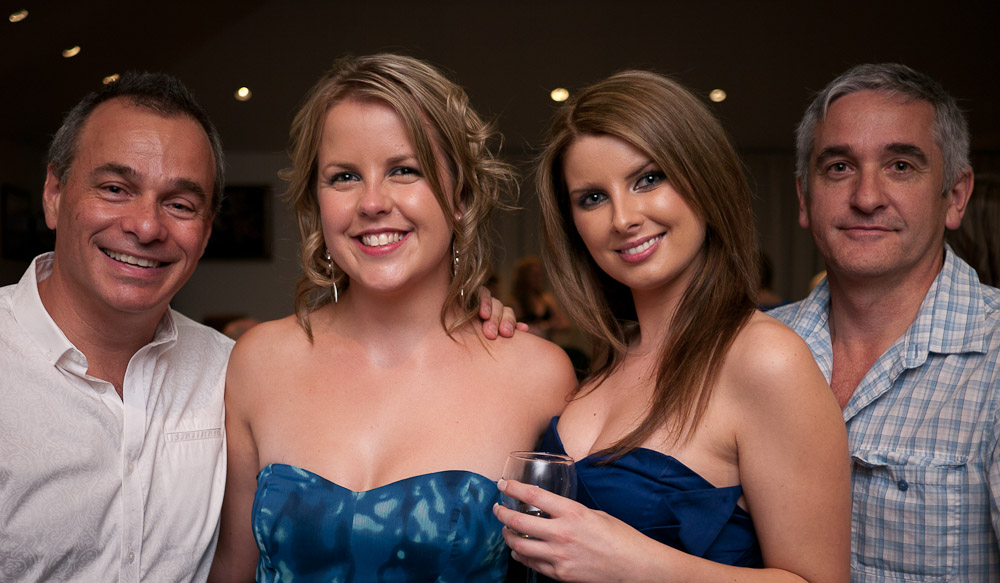
Here is a QUICK impromptu snap of my friends using this method at f/1.7 using the Panasonic 20mm f/1.7 pancake lens – my “party lens”:

portrait

If the room ambient lighting in the background is too dark for your liking, just play with the shutter speed – the longer the shutter speed using the above technique, the more ambient light you allow and the lighter the background will be.

If you are using a wide-normal lens like the 20mm f/1.7 pancake, avoid getting too close to your subjects as this will cause unflattering distortion making their noses appear larger than they are, etc, so stay at least 1.5 – 2m away, and if need be, crop your images later.

Also be careful of arms coming towards you such as resting on a chair, as these will also gain an unflattering distortion.

Your friends will be blown away with the quality of your photos – far better than point and shoot cameras with inbuilt flash and as good as dSLRs.

They will then likely say wow, what camera did you use to take those with – instead of saying what a great photographer you are – but that’s life – people treat photography quite differently to music – they would not dare say, wow, that sounded great, what brand piano did you use?

If you do not have an external flash, then you will have to settle for harsh, direct on-camera flash in the same manner as a point and shoot shot – just use the above settings but DON’T FORGET to POP UP the built-in flash!

The big group shot:

Then once everyone realises that you are a brilliant photographer capable of making them look good, inevitably you will be asked to do the group shot.

Now, in a dim room, with downlights, a group shot with minimal equipment could be hard to pull off well.

But not with the above kit and a bouncable ceiling, a great photo is easy to achieve, just step back far enough to get everyone in making sure that your flash can aim at the ceiling well in front of the group (you may need a decent flash for this or increase your ISO and open your aperture to get enough light from your flash).

 What happens when you use other exposure modes on a Panasonic GH-1 in low light indoors?

SCN mode “Party”:

  • this should do the trick shouldn’t it?
  • if you don’t put the flash up, it puts ISO = Auto ISO and you will probably end up with ISO 400 even if you have ISO limit higher than that, and if you have a f/1.7 lens, a slow shutter speed to match the ambient lighting which will most likely end up with camera shake or subject movement – not what we want unless ambient light is bright enough and your lens aperture is wide enough to allow a fas shutter speed.
  • if you put the flash up, ISO is set to 100, aperture at the widest but still shutter speed is set to match ambient just as above, so now our subject will be blurred from subject motion but combined with a sharp component from the flash – this may be a useful effect but most will not want this.

Portrait mode:

  • don’t use this indoors without a flash unless you choose “indoor portrait” otherwise ISO is set to 100, and even at widest aperture that it selects, shutter speed will be far to slow.
  • with flash up, it can be useful, ISO set to 100, aperture widest and shutter 1/30th sec and you have the option of “soft skin setting”
  • interestingly, even with the flash up, the flash does not fire using the “indoor setting”

iA exposure mode – the “dummies” mode:

  • if the flash is down, ISO will be the highest allowed as set in ISO LIMIT, aperture the widest, and this will give you the fastest shutter speed possible for the available light – if you don’t want to use flash, this is just what you want.
  • if the flash is up, ISO will be set to 100, aperture the widest, and shutter to 1/125th sec which will expose your subject well with the flash and reduce blur, while the background ambient will be under-exposed – again this is not a bad outcome indeed.

“A” exposure mode – aperture priority:

  • you should set the widest aperture for the lens
  • if the flash is down, Auto ISO setting will give the  lowest ISO to keep the shutter faster than 1/30th sec as long as ISO LIMIT is not reached due to very low light, in which case, shutter speed becomes slower and you will get subject blur.
  • if the flash is up, shutter speed will be set to 1/30th sec and Auto ISO will set ISO to 100 – this shutter speed will risk subject blur  if ambient light is bright enough.

“P” exposure mode – programmed mode:

  • aperture will be set to the widest
  • Auto ISO and shutter speed will be set as with A mode with lens at widest aperture

“S” exposure mode – shutter priority:

  • this could get you into a lot of problems in low light with flash down if you are not careful
  • with flash down, you select the shutter speed, and if ambient light allows, Auto ISO will be set to lowest (100) as first priority with aperture at the widest needed for this ISO. If there is not enough light at widest aperture and lowest ISO, the ISO will then be increased but not beyond the ISO LIMIT setting. If higher ISO than this is needed, the image will be under-exposed and the viewfinder values will flash red to indicate this. You should then choose a slower shutter speed until you are back in a possible exposure range.
  • with flash up, you can select a shutter speed but no faster than the flash sync speed of 1/160th sec. Auto ISO will set ISO to 100, and the aperture will be set to the widest available without causing over-exposure due to ambient light.

My conclusions:

  • use manual mode when using the flash up if you want control over the aperture, shutter speed and ISO but still have automatic exposure of the flash.
  • using iA mode seems a reliable option for either no flash or flash and is the probably the best option for beginners
  • avoid A mode for indoor parties as you are likely to end up with a slow shutter speed of 1/30th sec which may cause subject blur unless you specify a higher ISO setting such as 400 for indoor parties with a wide aperture lens and aperture set to the widest aperture
  • consider S mode if you want to achieve a certain blur effect from a longer shutter speed, but use Auto ISO setting
  • avoid the Party Scene mode unless you want blurred subjects when they are moving
  • if you want softer skin effect, choose Soft Portrait mode but use a flash!
  • the Indoors Portrait mode will NOT allow use of a flash!
  • there is also a creative portrait mode which allows you to alter depth of field by adjusting the aperture.
 

An exciting if not controversial Micro Four Thirds weatherproofed macro video-optimised power zoom kit lens from Olympus

Written by Gary on December 14th, 2011

The announcement today by Olympus of this new Micro Four Thirds system zoom lens is exciting because it is the 1st Micro Four Thirds lens to be weatherproofed and thus signals a long awaited weatherproofed high end Micro Four Thirds Olympus camera is on the way – assuming Olympus survives its current corporate turmoils.

The Olympus m.Zuiko digital ED 12-50mm f/3.5-6.3 EZ macro power-zoom video-optimised MSC lens.

But first, let’s deal with the controversial part – f/6.3 aperture at the long end:

  • let’s face it NONE of us want a lens with f/6.3 as it’s brightest aperture if we had a choice
  • but photography is all about compromise, especially when factoring in the following important characteristics:
    • price – this is extremely important in the mirrorless sector as most adopters would baulk at lens prices over $500
    • size – the whole point of mirrorless cameras is compact size so a large heavy lens would not suit most adopters
    • quality – the reason many choose Micro Four Thirds is that it gives great image quality for the size and optical quality is critical for success
    • convenience – adopters want an all-purpose lens they can take almost anywhere, even if it starts raining and use it for macro if need be
    • HD video – this has become increasingly important over the past few years, and this lens has been optimised to address this
  • so Olympus could have made this an f/2.8-4.5 lens but one or more of the above would have to be compromised and you would still need the 45mm f/1.8 lens.
  • in the end, perhaps the f/6.3 compromise is the easiest to manage as most adopters should have the affordable 45mm f/1.8 portrait lens as well to manage this issue.
  • perhaps a bigger compromise is the length of this lens at 83mm, it is the same as a 10x zoom lens for Micro Four Thirds – this may actually be more of a show-stopper for many!

Let’s have a look at some of the interesting features of this lens:

  • 24-100mm field of view in 35mm camera terms – perfect for most people including travellers and nature photographers
  • weatherproofed – just what we have been waiting for – the past Four Thirds weatherproofed pro lenses were highly prized but were big, heavy and expensive (most were over $1200)
  • macro mode – allows macro to 0.72x in 35mm terms (ie. smallest area 36x48mm at close focus of 0.2m)
  • non-telescoping zoom – does not need to extend during shooting – zoom elements are contained within the lens barrel to make it easier to weatherproof
  • motorised zoom (power zoom) – zoom ring controls speed and direction of zoom for smooth zooming during video
  • faster, near silent autofocus – new linear MSC focus-drive mechanism enhanced by new linear motor for faster, smoother AF performance
  • superb optical design – 10 elements in 9 groups (Dual Super Aspherical, Aspherical x2, HR and ED Lenses) with a floating lens design which optimises internal lens element positioning which maximises zoom and focus performance at all capture distances.
  • circular diaphragm blades for nicer bokeh
  • small 52mm filter size – thus cheaper filters
  • light and reasonably compact – only 211g and measures a constant 57 x 83mm
  • AF lock setting – the L-Fn (Lens Function) button suspends the autofocusing operation temporarily to avoid unintended focusing on obstacles that appear suddenly between the camera and the subject.
  • reasonably affordable – estimated street price $US499

Olympus generally tend to judge the lens market quite well and assuming it is as good optically as we have come to expect from Olympus, I think this lens will find a lot of fans once they get over the f/6.3 psychological hurdle.

To me it makes a lot of sense as a general kit lens and gives users another very handy option indeed, and if they offset the f/6.3 issue with a 45mm f/1.8 portrait lens then they will have a very useful compact kit indeed.

On the other hand there will be a lot of users like me who just want the near impossible, a 12-50mm constant f/2.8 weatherproofed lens with macro in the same size lens but for $699 – that is just not likely to happen. Olympus do have the excellent 14-54mm f/2.8-3.5 Four Thirds lens but this is substantially bigger and heavier.

This would be a brilliant lens for the helmet-cam/body-cam sports videographer:

I could imagine a downhill snow ski videographer mounting a compact weatherproofed Micro Four Thirds camera with this lens onto his helmet to shoot some very exciting video sequences.

The f/6.3 aperture would not be an issue as he would be wanting a reasonable amount of depth of field.

The AF lock could be crucial so he could lock focus before he starts and know that all the motion is not going to upset the focus point, and AF on a rapidly moving camera is not going to be very successful anyway. I am assuming this L-Fn will operate like this as there is little detail regarding this function – of course, it may just be what it says, if you think someone is about to walk between you and the subject, you just press this button and AF is temporarily suspended to avoid change in focus. The question is for how long is AF suspended – until you take your finger off, for a specified time interval, or until you press it again?

The large power zoom ring would be very easy to operate with gloves so he could quickly adjust his field of view.

The weatherproofing obviously becomes a critical feature in such conditions.

So many great kit lenses for Micro Four Thirds users – kind of puts the kit lenses for entry level Canon dSLRs to shame in terms of optical quality and build quality – just head over to lens reviews on dpreview.com to compare the optical performances to see what I’m talking about.

Now, to eagerly await a weatherproof camera from Olympus to match the lens!

More info here.

See here for more Micro Four Thirds lenses.

Please Mr Olympus, can I have the Rokinon 85mm f/1.4 in a more compact, Micro Four Thirds autofocus version, if not, a 100mm f/2.0 would be brilliant.


Tips for better photos with your new Micro Four Thirds digital camera this Christmas

Written by Gary on December 11th, 2011

Many people will be upgrading from point and shoot digital cameras to mirrorless cameras with much larger sensors and better image quality this Christmas.

One of the best to go for this Christmas is the Panasonic GH-2 or the more affordable Panasonic G3 Micro Four Thirds camera.

Most of the following tips will also apply to the excellent Olympus Micro Four Thirds cameras such as the E-P3 or E-PL3.

Most will buy the twin kit lenses although some will opt for just one 3x zoom lens or perhaps the 10x zoom lens.

The Panasonic and Olympus kit lenses are actually very good lenses and well worth having, but like all kit lenses, are really only useful in bright conditions such as outdoors. They are substantially better optically than the Canon kit lenses which not only are much larger, but have the extremely annoying problem of the front element rotating as you focus making use of polarising filters and gradient fiters much more frustrating.

Beginners will initially resort to the iA camera mode (intelligent auto mode which tries to determine the best settings for the scene it detects).

This is fine until you get used to using your camera and you start to understand ISO, aperture, shutter speed, exposure compensation and depth of field.

Some basics of photography:

  • the smaller the number in the f value, the wider the aperture and the more light comes in, and the more you can blur the background
  • as a general rule, shutter speed to minimise camera shake should be faster than 1/focal length of the lens. eg. using a 100mm lens, one should aim for a shutter speed of 1/100th sec or faster.
  • bright sunny conditions generally require the following exposure settings – the “sunny 16 rule” – f/16 and shutter speed 1/ISO. eg. if ISO 100, then need shutter speed 1/100th sec. You can use this as an easy to remember baseline if you want to work out manual exposure starting point.
  • avoid using very small apertures such as f/16 and f/22 as although you get more depth of field, sharpness overall will be less due to diffraction effects.

As good as the iA mode is, it can’t determine what YOU would like your images to look like, so let’s look at a few tips for better photos with these cameras.

Keep your camera and lens clean and dry:

  • avoid getting dust on your sensor – change lenses quickly and in dust free conditions where possible
  • avoid getting fingermarks, etc on your lens glass – consider using a protective high quality UV filter. Cheap filters degrade image quality especially if light sources hit them causing flare.
  • dirty lenses or filters will decrease image quality – clean them with care!
  • none of these cameras are weatherproof – rain or salt water will not be tolerated well and you may end up with a dead camera

Ensure your camera battery is fully charged before an outing and your memory card is empty:

  • nothing worse than having a flat battery or run out of memory so you can’t capture that magic moment
  • remember to always backup your important photos onto at least 2 different devices in case one fails, is stolen or is lost, or you accidentally delete the images.

Take control of the aperture – BLUR the background or make everything sharp:

  • With the larger sensor size, you now have more control over how much is in focus and how much the background is blurred, particularly if you are lucky enough to have bought a wide aperture lens as well such as the Olympus 45mm f/1.8 portrait lens or the Lumix 20mm f/1.7 pancake lens.
  • Take control of this by changing your camera exposure mode to A instead of iA – over 90% of my photos are taken in A mode (aperture priority).
  • This mode means YOU MUST select an aperture to use and the camera will adjust exposure accordingly.
  •  If you want the background blurred, you should select the widest aperture possible for that lens eg. f/1.8 for the portrait lens, f/3.5-5.6 for the kit lenses depending on the amount of zoom you are using.

Get rid of harsh shadows in your outdoor portraits – use fill-in flash:

  • If you are shooting people relatively close up (less than 3m or so away) in outdoors, consider forcing the flash to fire as a fill-in flash to remove dark shadows on their faces.
  • First, flip up the flash to turn it on, set exposure mode to S so that you can set the fastest shutter speed for flash on these cameras which is 1/160th sec, set menu under camera setting to FLASH = lightning symbol (not lightning symbol followed by A) as this will force the flash to fire whether or not the camera thinks it should.
  • Then set the related menu item, FLASH ADJUST to a negative value such as minus 1 EV because we don’t want the flash to dominate the image but just a touch to get rid of dark shadows and add catchlights to the subject’s eyes.
  • Note that the built-in flash will not be powerful enough to significantly reduce shadows due to bright sunlight.
  • Bright sunlight, generally requires use of a polarising filter or ND filter to allow larger apertures, and a more powerful external flash such as the Olympus FL-50. If you are crazy enough to be doing a lot of bright sunlit portraits and wanting less harshly lit results, then you may be better to choose a high end dSLR with a flash sync of 1/300th sec instead of the 1/160th sec on these cameras.

Shoot in RAW plus jpeg for the best quality images:

  • if you value your photos and at any time in the future may decide to adjust your photo in Photoshop or Lightroom, etc, then you should set your camera menu item to QUALITY = RAW ::: as this will save 2 images – the RAW file and a jpeg file
  • Ensure your jpeg file is also being saved at its largest size (unless you specifically just want a small image), set camera menu item to PICTURE SIZE = L
  • the RAW file will take up more room on your memory card but it records MUCH more data than a jpeg file and will give you much better image quality if you start manipulating your image on a computer.
  • the RAW file should be regarded as your negative in the days of film – keep it safe, you never know when you will want to play with it.

 Buy an image processing software package such as Adobe Lightroom:

  • most people have seen the nice effects which can be achieved using iPhone apps such as Instagram.
  • you can do much better than this using computer software such as Lightroom and basic image modification to alter the feel of the photo, add vignetting (darkening around the edges to force viewer to concentrate on your subject)  and remove skin blemishes is not that hard to learn and will value add to your photography immeasurably.
  • Lightroom can then be set to export the end image to an image size appropriate for uploading to the web, or for printing.
  • you can use Film Mode on your Panasonic camera to create a different look in the camera of your jpeg (it will not affect your RAW file), but it is not the same as using Lightroom.
  • the Film Mode though is very handy for shooting movies!

Watch that exposure compensation dial:

  • a very important function is the exposure compensation dial which allows you to over-ride the camera’s guestimate of the exposure so that you can tell the camera very easily to make it lighter or darker.
  • the camera will try to give most of your subject the darkness of mid-grey, but the camera is easily confused when you have a dark or very light subject, or the background is dark or very light.
  • this dial gives YOU the chance to take some control of this.
  • the dial is a toggle – you push it in to swap between exposure compensation mode and changing the settings mode.
  • fortunately, Panasonic has moved this dial away from the front position as on the GH-1 where it was easily accidentally changed causing exposure errors.
  • ALWAYS check the viewfinder -3..0..+3 setting to check that this exposure compensation is set appropriately.

Use the viewfinder not the LCD screen to take your photos:

  • holding a camera at arms length will result in camera shake and this will decrease the sharpness of your photos and may even give blurred photos, particularly in low light or when using telephoto zoom settings.
  • hold the camera to your eye and brace it carefully to reduce camera shake

Try to keep ISO to less than 800:

  • photography is all about compromise
  • the higher the ISO is set, the more sensitive the sensor becomes to light, but there is an image quality cost to this benefit
  • image quality in terms of noise, and the amount of light and dark can be shown in the same image (“dynamic range”) is best at lowest ISO values such as ISO 100-200
  • in low light, or for fast moving subjects, if you do not have a wide aperture lens, you may need to increase the ISO to allow an adequate shutter speed to reduce blurring due to camera shake or subject movement.
  • the current cameras will give excellent results at ISO 100-400 but noise starts to be visible at ISO 800 and higher, but may still be very acceptable even at ISO 1600.
  • as a last resort, you may need to use even higher ISO such as 3200-6400.
  • larger sensor cameras have less noise at higher ISO but these have other compromises such as larger lenses, etc.
  • in the camera menu, you can set ISO LIMIT = 800 which will come into play if you set ISO to AUTO and you use an exposure mode other than M.

Manage your focus settings:

  • in general, use AFS instead of AFC as AFS means that the camera will only try to auto-focus when you half-press the shutter rather than continuously as with AFC
  • continuous AF can be useful when shooting movies or sometimes for moving subjects, but usually it gets in your way.
  • using AFS means you can half-press shutter button to focus on your subject, then while still keeping it half-pressed, compose your scene and then take your shot
  • the AF options on the camera menu or on the AF button allow various options:
    • face recognition mode (assuming you have set menu item FACE RECOGNITION = ON) obviously is very useful for portraits although can be a little slow
    • subject tracking mode can be useful for locking onto a relatively slowly moving subject – just position the central AF markers on your subject, half-press shutter release so that camera selects that subject to target, remove finger from shutter release and the camera will track that subject until it disappears from the field of view. This can be very handy for some situations but I must admit I use it rarely.
    • multiple region AF mode – has a built-in algorithm for focusing on a subject anywhere in the field of view, unfortunately, the camera will often AF on everything but not the subject you are after.
    • centre spot AF modethis is by far my favorite mode. Just place your subject in the centre of screen, half-press shutter and hold to lock onto that focus, recompose scene and take your shot. If there will be a delay in taking the photo, press the AF lock button instead of using the shutter release. A green circle will display to show focus is locked. To unlock the focus lock, press AF lock button again.

 Buy a circular polarising filter of the size to fit your lens:

  • this filter can serve several functions but should only be used in bright conditions outdoors
  • on a sunny day it can give nice rich blue skies (you will need to adjust the filter by rotating it), particularly if the sky is right angles to the position of the sun.
  • it is essential for getting nice saturated leaf colours when taking photos of forests even in overcast conditions
  • it cuts down the amount of light coming in which may allow use of larger apertures in sunny conditions – for instance, most Panasonic cameras have a fastest shutter speed of 1/4000th sec and even using ISO 100, you will not be able to use f/1.7 aperture in bright sunlight without over-exposing the scene.
  • cutting down light also allows longer exposures for those moving water shots (requires a tripod)
  • it can reduce reflections on water and glass which can be used to advantage

Buy a Cokin soft gradient filter for dramatic cloudy skies and storms

  • unless you have the sun behind you, the clouds will generally be over-exposed in your photos and lack detail
  • a solution to this is to place a half-filter in front of your lens and adjust it up or down so that the clouds are made darker
  • most commonly used is a 0.6 soft ND (neutral density) filter
  • you can get coloured versions such as a tobacco one to enhance sunsets, etc.
  • fortunately for the smaller lenses used with Micro Four Thirds cameras, you can use smaller and thus cheaper filters – the Cokin A size would be adequate for most lenses. dSLR users generally need the larger P size filters.

 Buy a wide aperture lens for indoor use and blurring backgrounds:

  • the kit lenses have widest apertures of f/3.5-5.6. These do not let enough light in for most indoor or low light photography, although you can resort to using flash but autofocus may be slow.
  • a wide aperture lens allows faster autofocus in low light, more ability to blur the background and ability to do hand held shots without a tripod or a flash even indoors or outdoor at night.
  • examples of such lenses include:
    • Panasonic Lumix 20mm f/1.7 pancake lens – tiny but sharp and can be bought for about $350 – very nice party lens and street lens at night time
    • Panasonic Leica-D 25mm f/1.4 for Micro Four Thirds – a little larger but better quality lens and more expensive (don’t get confused with the much larger and heavier Four Thirds version which will give similar results – see here for examples of the great photos one can get with this)
    • Olympus M.Zuiko 45mm f/1.8 – a nice portrait lens with more telephoto than the above, can be bought for about $350-400 – this is probably the best lens for most beginners to get so they can get their nice portraits. This lens will allow similar background blurring as with these taken with the Olympus 50mm f/2.0 macro lens, although of course, you will not get as much macro with this 45mm lens.
    • Olympus M-Zuiko 12mm f/2.0 – a beautiful wide angle lens with nice manual focus as well as fast AF – not for most beginners though, and will not blur the background much given it is such a wide angle lens, but very handy for low light travel photography.
    • Rokinon 85mm f/1.4 lens – a large, heavy lens with no autofocus but at $265-280 it gives fantastic photos with beautifully blurred backgrounds  at a very affordable price – but you do need to use manual focus. Plus you need a MFT adapter (from China on Ebay for ~$20).
    • Olympus OM 100mm f/2.8 lens – manual focus only but very nice for night time concerts – buy 2nd hand on Ebay for ~$150, plus you need an OM-MFT adapter (from China on Ebay for ~$20)

Buy an external flash:

  • direct flash from the camera generally should only be used as a fill-in flash (see above) or as a last resort when there is not enough light
  • buy an external flash which sits in the hotshoe of the camera and which you can rotate and aim at a white wall or ceiling to give a much nicer “bounce flash” for your party portraits
  • a nice cheap one to aim for is the Olympus FL-36 or its newer, more expensive version, the FL-36R (Panasonic cameras unfortunately do not utilise remote TTL flash and so there is no added benefit of getting the R version. The Panasonic branded flashes do not add anything and are too expensive).
  • it has enough power to bounce the flash while being not too bulky for these cameras (the more powerful FL-50 is a bit big)

 Start looking for good lighting and composition:

  • as good as the camera is, the photo is generally very dependent upon the lighting on the subject and how you have composed the scene for visual impact.
  • many professionals will spend far more on lighting than on their camera
  • lighting is incredibly important to the success of most photos
  • look for lighting situations which flatter your portraits – generally light coming from 45deg angle above, and preferably coming from a wide area such as a window rather than a small light source such as a flash or the sun. Consider placing your subjects under a verandah to avoid harsh overhead lighting.
  • don’t bother photographing high contrast scenes in high contrast lighting eg. waterfalls or forests on a sunny day are generally not going to do well – wait for overcast periods and use a polarising filter, or consider very early morning or dusk – the goldern hours when light is not so contrasty.
  • generally avoid light sources hitting the front of your lens as this will create flare and decrease contrast – unless you want this effect such as in some portraits at sunset.

 Experiment:

  • getting better at photography is not only about learning more but more importantly actually getting out there taking photos and experimenting with different settings, different lighting, different compositions.
  • digital photography brings to you an amazing opportunity to experiment and get immediate feedback on your results so the learning process is much easier and faster, and no longer as expensive as it was in the days of film.
  • the experimenting does not need to stop in the camera but continues on your computer.
  • the mirrorless cameras such as Micro Four Thirds and Sony NEX allow you to buy relatively cheap legacy manual focus lenses on Ebay for well under $200 and can open up new avenues of experimentation such as macrophotography, blurred background and lovely bokeh photography on the cheap.

 Some notes on using legacy manual focus lenses:

  • you will need an adapter to fit onto these cameras (check Ebay – usually about $20-40)
  • these do not have electronic communications with the camera so the camera cannot control them, nor will the camera know what aperture you have set on them.
  • you must manually set the aperture by moving the aperture ring on the lens
  • you must use A or M mode on your camera
  • you must set the camera to manual focus (MF) mode
  • on Panasonic cameras, you must set the camera menu item under C-spanner SHOOT W/O LENS = ON otherwise you will get a message that lens is not attached properly
  • on Panasonic cameras, the flash may give inaccurate exposures in TTL mode, use manual flash mode instead.
  • on Olympus cameras, you need to set the lens focal length on the IS (image stabilisation) button so that the camera knows how to adjust the IS function.
  • to focus accurately, use the camera magnified view capability, on the Panasonic, this is invoked by pressing the AF button and then you can use the arrow buttons to move the selected area around before pressing the OK/menu set central button to go into magnified view. Half-press shutter to return to normal view.

Click here for more tips on taking better photos including some basic rules of composition.


Concert photography from the back row

Written by Gary on December 9th, 2011

We all want a little memento of the concerts we pay lots of money to attend and enjoy but taking a reasonable photo from 100m or more away is challenging given the constraints imposed by the concert venue – in particular – most only allow photos from “small digital cameras” and ban videos.

Don’t bother bringing a dSLR or large lenses – the security staff will almost certainly ask you to put it away.

Simple point and shoot cameras with their tiny sensors and minimal telephoto zoom reach are not going to get very good quality shots unless you are lucky enough to get to the mosh pit near the stage.

My solution which pushes the venue limits and may still require some discretion, in particular, you do not want security staff to be given the impression your are doing long sequences of video as that would be banned no matter what camera or lens you use.

Camera choice:

The best compromise then is a small, compact mirrorless camera with a built-in electronic viewfinder (you do NOT want to be distracting everyone with bright light coming from an LCD screen – use the viewfinder to do everything).

I use a Panasonic GH-1 Micro Four Thirds camera although even this is probably getting a bit big for venue staff – a smaller mirrorless camera such as a Olympus E-PL3 with the optional viewfinder may be a better option, and the Olympus cameras have the added benefit of built-in image stabilisation which can be useful in this situation where you will be using relatively slow shutter speeds of 1/125th second for 200-270mm telephoto reach at ISO 800.

The newer Sony NEX mirrorless cameras (eg. Sony NEX 5n or NEX 7) could be used if they have an electronic viewfinder but they have the disadvantage compared to Micro Four Thirds in that the same size lens does not give you as much zoom – and for this, you want as much telephoto reach as possible from your lens. Furthermore, they do not have built-in image stabiliser like the Olympus cameras do.

Lens choice:

Next step is to choose a lens to use which will give you enough telephoto reach without being too large that venue staff will object.

My preference is a legacy manual focus Olympus OM lens with wide aperture.

Olympus OM because they are among the most compact lenses you can get.

Manual focus lens because, I like to manually focus and then just leave it carefully in that focus position so I can just pick the camera up, turn it on and I am ready to capture a key moment without having to worry about focus – autofocus lenses may struggle in many concert lighting conditions and may cause you to miss your shot.

The Olympus OM 135mm f/2.8 lens is probably the largest lens you can get away with and this gives you sufficient telephoto reach for a large concert venue while the f/2.8 aperture allows you to keep ISO around 800 and shutter speed around 1/125th – 1/200th sec.

If you know you will be a bit closer to the stage, the Olympus OM 100mm f/2.8 lens is smaller and much more likely to be acceptable to venue staff.

Next step is to set your camera up.

Firstly make sure it will NOT be firing the flash – flash will be useless at such distances, it will drain your battery and it is really, really annoying to everyone else.

Set your ISO to ISO 800 – a lower ISO will mean shutter speed will be too slow for hand held telephoto shots and you will end up with too much camera shake.

If your camera is an Olympus, set image stabiliser to the focal length of the lens you are using – assuming it is a legacy lens such as an Olympus OM lens.

Next, set your exposure mode to MANUAL and with your lens wide open (eg. f/2.8), take a few shots at different shutter speeds until the exposure of the faces on the stage under the stage lighting looks adequate – this will be something like 1/125th sec.

Finally, use magnified view to accurately focus your lens on the stage.

Then you are ready to go.

These images have not been cropped and have not had any post-processing (except colour adjustment in the last one) other than resize to web size and the default Lightroom export sharpening for screen.

Elton John

Elton John in concert, Melbourne 2011

Taken from a long way back using Panasonic GH-1 with Olympus OM 135mm f/2.8 lens.

Elton John

Elton John


Panasonic GH-2 Micro Four Thirds camera gets a very useful firmware update

Written by Gary on December 9th, 2011

Version 1.1 firmware update includes:

  1. Added a video mode [HIGH BIT RATE] which is suitable for editing video recorded at high bit rate(24Mbps). ie. for 1080/30p or 25p HD video.
  2. Added a function [POWER ZOOM LENS] when using power zoom lens.
    ([DISP FOCAL LENGTH], [STEP ZOOM], [ZOOM RESUME], [ZOOM SPEED], [ZOOM RING]*)
  3. Full area enlargement of AF area setting.
  4. Improved in the speed of consecutive shooting when shot with auto bracket.
  5. Increased number of recordable images in consecutive shooting.
  6. [EX.TELE CONV. (Extra Tele Conversion)] can be set ON/OFF separately in photo or video recording.
  7. More accurate light adjustment of built-in flash.
  8. Improved in the AF performance in video recording.
  9. Synchronization of alarm volume for low battery with [BEEP VOLUME].
  10. Added a function [HALF PRESS RELEASE].
  11. Improved NR (Noise Reduction) in high sensitivity shooting.
  12. Added a function [TOUCH SCREEN] which is ON/OFF control of touch-screen.

* Available with LUMIX G X VARIO PZ 45-175mm / F4.0-5.6 ASPH. / POWER O.I.S. only.

It would seem some of these upgrades are derived from Panasonic G3 (eg. improved noise reduction).

see firmware update service


Dummies guide to upgrading from point and shoot camera this Christmas

Written by Gary on December 1st, 2011

Most people with little photographic knowledge who currently use point and shoot digital cameras and who want to upgrade to a better camera do so for one or more of the following reasons:

  • better image quality – more like the pros
  • ability to blur the background
  • ability to shoot action shots of fast moving subjects

Unfortunately, there is no one camera that suits every purpose best, and worse, the more versatile and capable the camera, the more complex it is to use and thus the LESS SUITABLE it is for a beginner who does not understand complicated basic concepts of exposure, ISO, aperture, shutter speed, focal length, let alone the myriad of settings which can be set on the more advanced cameras.

Many think that just by purchasing a dSLR they will get better photos, but the truth is more that they need to spend much time and thought understanding and practicing and experimenting with the basics.

Furthermore, they are likely to be sold a dSLR with one or two “kit” lenses which in reality will give them photos that “look” much like their photos from their point and shoot cameras. This is because they are expecting to automatically get ability to blur the background like the pros do, but the kit lenses at f/3.5-5.6 are just not going to give them that capability unless they are shooting with a telephoto at a subject at close range.

If you want to blur the background you need a lens with f number of f/2.8 or a smaller number (eg. f/1.8, f/1.7 or f/1.4) and no portrait zoom kit lens is like this. Those lovely wedding photos pros take, are often shot with lenses such as a 70-200mm f/2.8 IS which will set you back over $2000 for just the lens, but you could achieve similar results with a cheaper pro lens such as a 135mm f/2.0 lens but this still costs over $1000 for just the lens. I don’t like carrying big expensive lenses like these around, so I achieve the same image quality with a cheap manual focus lens, the Rokinon 85mm f/1.4 ($265).

They also may not realise that unlike the days of film when cameras were an investment and lasted 30 years or so, their new dSLR is likely to be needing replacement in only 5 years – ouch!

Despite this, if the prime aim is to shoot fast moving subjects, then at this moment in time, the dSLR is the way to go, and preferably one designed for such shots and unfortunately, this means at least a mid-range camera which will set you back around $1500-2000, and higher if one wants a weatherproofed model which won’t die if it gets some rain on it.

Most beginners, would be best settling on a camera that will be small and light enough they will actually take it with them and learn to love experimenting with it without it being intrusive and embarassing for them to use at social events.

The best type of camera for most of these beginners is a “mirrorless” camera – quieter, smaller, lighter and generally easier to use than a dSLR, but still able to give the same image quality (or close enough that it does not matter) and still get the ability to blur the background.

If you need some convincing that such a camera will be adequate, check out some of my photos taken with a Panasonic GH-1 from around the world and you can see it is a very capable and versatile camera indeed.

While Nikon has just introduced their version of this style of camera, it has a smaller sensor and it will be not as suitable for blurring the background as the other brands which I will thus concentrate on.

Essentially, there are 3 brands I would look at for the beginner looking to upgrade from a point and shoot, and 2 of these (Panasonic and Olympus) share the same lens mount technology (“Micro Four Thirds”) which means there are LOTS of lenses and camera models available to choose from. The 3rd brand is Sony (sorry Canon has not yet developed a camera in this style).

ALL of these cameras have a good enough image quality and number of pixels to satisfy the vast majority of users so let’s forget about this aspect as nitpicking can get confusing and there are pros and cons which in the end do not matter that much to most people.

The MOST important consideration is what lenses to buy and can you afford them and how big are they.

The new Sony NEX 5n and NEX 7 are very nice cameras but unfortunately, unlikely to be available before Christmas 2011 due to flooding destroying their factory in Thailand. Furthermore Sony lenses are larger, heavier and there are only a few to choose from at this stage.

That leaves us with Panasonic and Olympus Micro Four Thirds.

Olympus at present is having major corporate issues but this would not stop me buying Olympus Micro Four Thirds products as the presence of Panasonic reduces your risk substantially.

My favourite cost effective Micro Four Thirds camera at present is the Panasonic G3 (I own the older GH-1, and would love the even better GH-2 but this is quite expensive), but if you plan to do a lot of photography on the cheap using old 2nd hand manual focus lenses, then I would strongly consider one of the new Olympus models (eg. E-P3 or E-PL3).

The Panasonic G3 with 14-42mm kit lens sells for $599 in the US but it is a ridiculous $849 in Australia – thanks for ripping us off Panasonic Australia!

See my comparisons of these here and you can see that within these cameras you have quite a range of choices including:

Cameras with built-in viewfinder and flip-out rotatable LCD screen for self-portraits:

  • Panasonic GH-2 – the high end video capable camera – $US759 body only,  $US795 with 3x zoom lens or $US1449 with 10x zoom lens
  • Panasonic GH-1 – the older but still very good high end video capable camera which has similar image quality to Canon 7D dSLR, but no touch screen and AF not as fast as the others here. $US599 body only.
  • Panasonic G3 – cut-down version of the GH-2 and thus good value for money at $US599 incl 3x zoom lens

More compact cameras with optional add-on viewfinder:

  • Panasonic GX-1 – for the advanced photographer – $US699 body only or $US949 with 3x power zoom lens
  • Olympus E-P3 – for the advanced photographer but also has built-in image stabiliser and better flash control – $US779 with 3x zoom lens
  • Olympus E-PL3 – flip out LCD screen with built-in image stabiliser and better flash control – $US599 with 3x zoom lens

Very compact “simplified”, less capable and cheaper cameras:

  • Olympus E-PM1 – built-in image stabiliser, $US449 with 3x zoom
  • Panasonic GF-3 – $US419 body only

Your next decision is which lens to get.

Most people will probably get the twin lens kit because the deals are usually quite good value for money and they make great daylight travel photography lenses.

BUT as I alluded to above, the kit lenses are not always going to give you what you want, and particularly in low light or indoors, they will not be very helpful, so IN ADDITION to these kit lens, you should strongly consider getting a low light lens for indoors or evenings.

Now for most young ladies who love to do hand held self-portraits or would like to do those party shots indoors withot having to use a flash, then a Panasonic G3 with its flip-out rotatable LCD screen combined with a Panasonic 20mm f/1.7 lens will get you those shots and capture them with beautifully sharp imagery whilst still having some background blurring, and you can do it with face recognition auto-focus – something that is not readily available on a dSLR!

This 20mm f/1.7 lens is ridiculously expensive in Australia even at the reduced price of $599 – try to get a 2nd hand one in Australia for under $350, or get one from overseas – they sell for well under $400 brand new elsewhere. This lens though is tiny and will be a pleasure to carry in your hand bag, but it does not have any zoom – you can’t have everything!

This 20mm f/1.7 lens is great for candid photography, parties and other social events, and fantastic for walking the streets at night – and in all cases, the f/1.7 aperture means you just need to bump the ISO to 400 or 800 and you can do all this without having to resort to using your flash – now you can’t do that with a point and shoot and get the same image quality!
The Lumix 20mm f/1.7 hand held at night last night:
Lumix 20mm f/1.7 handheld at night

Now if you have the money, you could get the even better but bigger Panasonic 25mm f/1.4 lens instead of the 20mm f/1.7 lens.

Other lenses to strongly consider:

  • Olympus 45mm f/1.8 – great for portraits but not hand held self-portraits
  • Rokinon 85mm f/1.4 manual focus lens in Nikon or Canon mount plus an adapter – this gives superb background blurring and is a lot of fun and sells brand new under $300 from Amazon.com.
  • see here for more information

Do yourself a BIG favor and take the time to try to understand the basic concepts of photography such as ISO, shutter speed, aperture, lens focal lengths so then you can take your camera for a real ride and get the photos that you want rather than the photos the default auto setting on the camera will give you.

All the modern cameras are capable of taking great photos, the limiting factor is most likely to be you,the subject and most importantly the lighting on the subject – but if you haven’t got your camera with you, you will not get any photo at all – hence, aim for the smallest, lightest camera that will do what YOU need – not what the guy in the camera shop needs.

I also have a comparison of Canon 550D vs Canon 7D dSLRs vs Panasonic GH-1 camera here which some may be interested in the general principles of the pros and cons – it all comes down to the lenses!


More Rokinon 85mm f/1.4 Micro Four Thirds fun

Written by Gary on November 7th, 2011

Another walk through my lovely home city of Melbourne, Australia yesterday, with only my Panasonic GH-1 Micro Four Thirds camera and the wonderful, cheap, manual focus Rokinon 85mm f/1.4 lens.

The old and the new, marvellous Melbourne:

marvellous melbourne

The surveyor:

surveyor

The immigrants, life sized statues:

immigrants

I extended my walk into the Botanic Gardens during the balmy warm Spring showers, and took time out to smell the roses – this image really is best seen in large view:

rose


Panasonic announces a new Micro four Thirds camera – an enthusiast’s compact – the GX-1

Written by Gary on November 7th, 2011

Panasonic GX-1

  • announced Nov 2011 at MSRP $US699 body only
  • 16mp sensor (? same as in the G3), compact enthusiast design with solid metal body weighing 272g similar to the GF-1 body styling
  • built-in pop up flash plus hot-shoe
  • optional add on EVF – the new high resolution 1.44megadot tiltable LVF2 viewfinder (older LVF1 will not fit!)
  • ISO to 12,800
  • revamped CD-AF with full-area AF, fast 0.09sec AF (10% faster than the G3), new AFF focus mode which allows half-press shutter to lock a subject but then move with the subject
  • 3″ touch screen 460K dot LCD
  • new level gauge, orientation sensor, 4 Fn buttons
  • stereo mic with choice of four microphone input levels
  • 17Mbps 1080i AVCHD video similar to the G3
  • same battery as G3 and GF2

For comparisons of Micro Four Thirds cameras, see here