My photography kit for trip to Europe October 2010

Written by Gary on September 29th, 2010

Well I have just about packed my bags, my wife’s iPad has now hit 27 hours and still going trying to backup a measly 4Gb of apps and music – see my last post – according to my calculations it will take at least 40 hours to do this back up and sync!

But the good news is, I have decided upon my camera kit to take with me for 4 weeks of photo tourism, and it all fits into a small inconspicuous backpack and comes in at 6.5kg so easily comes in under the airline cabin luggage limits.

My selection of lenses covers every focal length from 14mm to 800mm (in 35mm camera terms), as well as one of the sharpest macro/portrait lenses made (the Olympus ZD 50mm f/2.0), one of the best low light environmental portrait lenses (the Leica-D 25mm f/1.4), and a pancake lens for discrete street photography when security may be an issue.
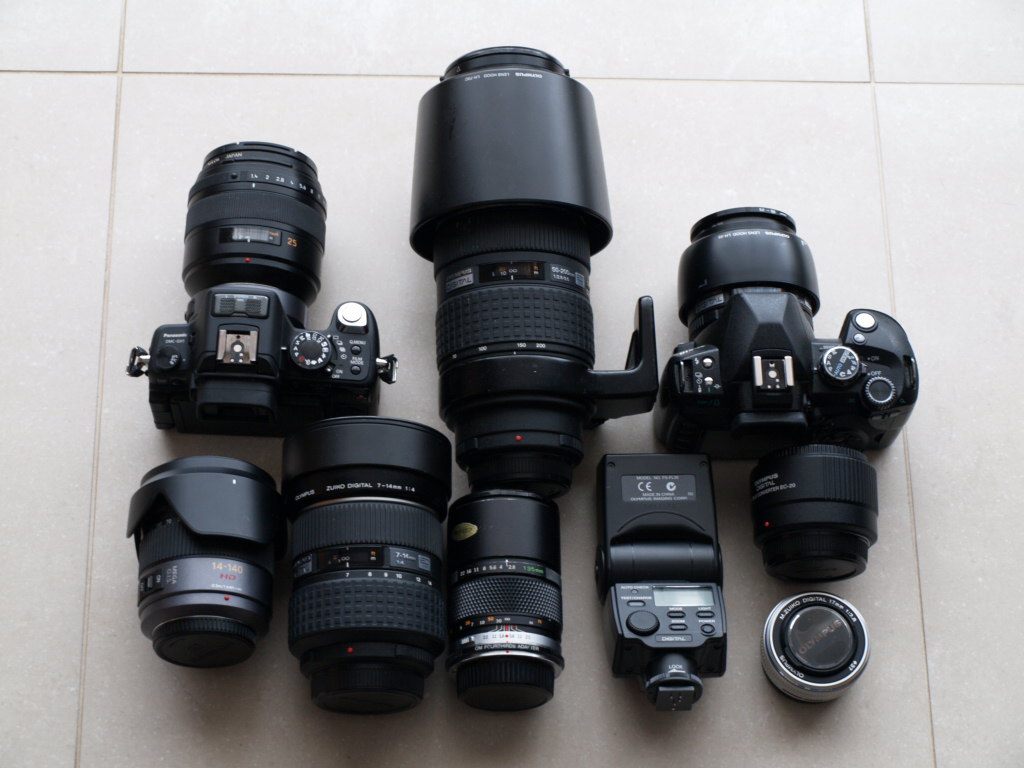
camera kit

From left to right:

Panasonic GH-1 with FT adapter and Panasonic Leica-D 25mm f/1.4 lens and lens hood:

  • this will be my main walk around camera because I love this combination so much
  • of course, a Panasonic 20mm f/1.7 lens would have been MUCH more compact and lighter, but I don’t have one of them
  • if I really need HD video, then the GH-1 will be adequate for my needs
  • examples of my photos with this lens are here

Olympus ZD 50-200mm f/2.8-3.5 SWD with lens hood:

  • this is one of my favorite lenses although a bit big and heavy for travel, and I procrastinated about whether to include this or not, but as I am going to Sweden in October and weather is likely to be wet and cold, the weatherproofing and additional rain protection of front lens element provided by the hood may well prove worth its weight.
  • there is no other lens that provides the versatility and quality of this lens for its weight, and adds opportunity for nice bokeh – I love it!
  • but will it be too conspicuous for thieves for urban walkabout use?
  • examples of my photos with this lens here
  • I can also combine this lens with the Olympus EC-20 2x teleconverter to give me hand holdable, image stabilised, 800mmm telephoto reach at f/7 – examples of my photos with this combination are here

Olympus E-510 with Olympus ZD 50mm f/2.0 macro:

  • the E510 is getting a bit old in the tooth now but it is a LOT lighter than taking my Canon 1D Mark III, and I would love to upgrade it to the new Olympus E-5 to make a perfect, unique combination when used with the 50-200mm lens.
  • the 50mm macro makes for a great walk around lens which I used last time I went to Europe  – example photos here
  • of course, it can be combined with the EC-20 2x teleconverter to give a relatively compact lens with 200mm telephoto reach at f/4 image stabilised, or a 1:1 macro – see example photos of this combination here.

Panasonic Lumix 14-140mm HD lens:

  • this is THE lens for HD video  and covers 28-280mm in case I need that range covered
  • I suspect though I may not use this lens as much as the above lenses, but sometimes one needs a relatively compact zoom – HOW wrong I was – see the post-script at bottom, I was too busy and pre-occupied to bother using any other lens during the day!
  • I often use this lens with gradient filters for landscape work.
  • examples of my photos with this lens here.

Olympus ZD 7-14mm f/4 super pro lens:

  • this lens covers 14-28mm and in cramped urban environments can be a very handy lens
  • a better lens for travel would have been the much smaller, lighter Panasonic 7-14mm lens for Micro Four Thirds but I don’t own that one, and this one will work on my E-510 as well as the GH-1 which will give it even more field of view with its 16:9 aspect ratio.
  • examples of my photos with this lens are here.

Olympus OM 135mm f/2.8:

  • this is a very handy compact solution which gives 270mm field of view and can be very handy for videos indoors at conferences with its f/2.8 aperture – just sit it on a tripod, manually set focus, exposure, white balance and let it go.
  • examples of my photos with this lens on the GH-1 are here.

Olympus FL-36 flash:

  • the perfect size for the GH-1 and travel with enough power to use it as a bounce flash
  • I decided to leave my FL-50 home.

Olympus EC-20 2x teleconverter:

  • this is a superb converter and will add to the options available with little extra weight or space needed.

Olympus 17mm f/2.8 pancake lens:

  • when you have a lens this small and light, its a no brainer to bring it along, particularly for times when you don’t want to advertise you have a camera for your personal security reasons, and it will allow the GH-1 to fit into my jacket pocket.

The extras:

  • compact tripod and a mini tripod – checked in luggage
  • gradient filters, Cokin adapter, 67mm and 58mm polariser filter, 58mm infrared filter, 52-58mm step, 62-58mm step rings
  • memory cards – 1x 16Gb SD, 2x 32 Gb SD, 1x 16Gb CF, 1x 8Gb CF
  • battery chargers, USB cable, spare camera batteries, AA batteries for flash
  • SD card reader and camera connection kit for iPad
  • Zoomit SD card reader for iPad to bypass Apple software issues and iTunes.
  • Lowepro Zoom camera case to protect the GH-1 inside the backpack
  • Olympus 50-200mm lens case to protect that lens inside the backpack

There is no way I could achieve this versatility with a Canon or Nikon outfit and come in at 6.5kg – this is THE domain of mirror-less cameras – the new Panasonic GH-2 is looking even more exciting and will be nicely complimented by the Olympus E-5 until a mirror-less weatherproof pro camera becomes available.

Post-script: so what did I actually use in Europe?

Firstly, I decided the 50-200mm was just too big for this trip, so it stayed at home.

The Lumix 14-140mm lens on the GH-1 was used for 90% of my walkaround daytime shots.

The Leica-D 25mm f/1.4 lens on GH-1 was used for 90% of my indoor (church, galleries) and hand held night time shots.

The Olympus E-510 with either 7-14mm or the 50mm macro did not get much play this time, mainly because my wife wouldn’t allow me sufficient time to think through an ultra-wide perspective shot, and I was not doing much shallow DOF work to justify getting the 50mm lens out of the bag. I should have had more fun with them, but after using the GH-1, I no longer enjoy the tiny optical viewfinder of the E510 and neither of these will autofocus on the Gh-1 – perhaps I should buy an E-5 to replace the E510 🙂

The size of my conference hall was smaller than I am used to, and thus the OM 135mm lens was not needed as the 14-140mm sufficed for my needs on this trip.

I used the 17mm pancake only once, on an evening dinner when I could only take a very compact camera kit in my wife’s handbag (begrudgingly of course) – perhaps if it had been a 20mm f/1.7 pancake it would have had more airtime.

I didn’t actually need the EC-20 2x teleconverter – the Lumix 14-140mm lens was adequate for my needs, and the only combination I would have considered using for was with the 50mm macro to give 100mm f/4.0, but the Lumix lens almost gave me this anyway.

I used the flash bounced off walls/ceilings for a few indoor family party shots, and the small tripod was used for a few low light shots.

I did not trust the iPad to adequately backup my photos, but in fact it seems that I could have relied upon it to do so, even though it was not self-evident at the time.

The ZoomIt SD card reader for iPad was a waste of money as it was far too slow in uploading photos.


 

Some early experiences with the Apple iPad – perhaps not as productive as I thought!

Written by Gary on September 28th, 2010

I bought an Apple iPad 64Gb 3G model last week for my wife to take on our trip to Europe.

Initial problems with iTunes syncing with no MicroSim card:

Initial sync with the latest version of iTunes running on Windows Vista refused to work until I installed a MicroSim card so it could “download updates for the carrier” – luckily I had a Micro Sim card for my iPhone 4 and this resolved this issue nicely, although it did require rebooting the computer and the iPad.

The one iTunes per device issue:

As most would be aware, you can only sync a iPad/iPhone/iPod with ONE iTunes version on a computer, so although I use my laptop iTunes to sync with my iPhone, I decided it best to use the desktop computer running MS Vista to sync the iPad so my wife could maybe one day gain control over it (not much chance of that happening – iTunes is far too temperamental!).

You can connect the iPad to another computer or user account with iTunes installed and you can add files to any apps installed with File Sharing capabilities BUT you cannot attempt to sync apps, music, photos, etc as it warns you that trying to do so will ERASE and REPLACE all such files from your iPad with those on the current iTunes.

Configuring the iPad does take time:

I had spent much of the week setting it up for my wife so it would sync with Google calendars (using the SaiSuke app), her Outlook contacts, and mail, loaded some of her music playlists, purchased and installed a number of iPad apps and configured them ready for her use without having to understand all the settings.

iTunes settings were set to manually manage music and not to encrypt the backup – so backup should work fast.

All seemed to be working well …. until last night.

The saga of the extremely long backup preventing iTune syncing:

Despite having the latest version of iTunes installed, and only 4Gb space used on the iPad, iTunes inexpicably started taking a LOOOONG time to even get a little way through the initial backup stage – after a couple of hours with the progress bar seemingly stuck on about 5% done.

I decided to reboot everything, delete the last backup (iTunes:Preferences:Devices), and reset sync history, as well as removing the MyPictures:IPod Photo Cache folder which has been reported to be an issue with iTunes sync problems.

The computer is running with 4Gb RAM, 92Gb free hard disk space – should be no problems for backing up 4Gb data!

Unfortunately, there does not seem to be a way of setting iTunes NOT to automatically back up the iPad during the sync process.

Installed latest version of iTunes (v10.01), rebooted everything again, tried to sync iPad and left it overnight running – after 10 hours, still in Backup phase but progress bar had made it to about 40% – NOT GOOD – so time to call Apple Support whose first priority was to try to sell me extended warranty (Apple Care for $A129 as I already had bought it for the iPhone) but I am not sure the warranty will cover me throwing the iPad against the wall!

Apple support advised to try what I had tried above, but as that hadn’t worked – time for drastic measures – a complete uninstall of everything Apple including iTunes, Quicktime, etc – see the specific order in which this needs to be carried out here.

Then reinstall the latest version of iTunes.

Somehow the uninstall process did not delete my music playlists so guess that is good and it recognised the iPad when I reattached it, and then immediately started to sync it, again of course by backing it up first.

After 20 minutes, backup progress bar had reached the ~5% mark and the feeling of deja vu had set in 🙁

We are leaving for Europe in 2 days – this is NOT what I was expecting from Apple!

My biggest fear is if I used the iPad camera connector and iPad SD card reader to backup up my travel photos, and when I get back I had to do a complete new install of iTunes and remove all traces of the iPad (not yet sure how to do this – guess I follow these instructions), that the initial sync might erase everything on the iPad before  had a chance to copy it onto a computer.

It certainly does not fill me with trust!

40 minutes into the sync process and surprise, the backup progress bar had actually progressed – albeit only to about 15%, but that was much faster than last night!

Fingers crossed and hoping it continues and completes its task before I leave for Europe!

60 minutes and it seems it is pretty much stalled at ~20% done – time for almost drastic measures!

Time to cancel the sync and go into iTunes preferences again – delete all backups, reset sync history, reboot everything, temporarily disable antivirus scanner, and try again.

So sorry Apple support, your advice just wasted a few more of my precious hours, perhas you could have told me the truth about the backup/sync debacle, and given me some real advice!

I don’t really want to delete all user preferences just yet – that would be another day’s work recreating them and it may erase all my good work on the iPad in setting that up.

Same thing again.

Almost time to throw it against the wall.

Google search of the web found this great blog post which may help solve the issues – perhaps its time to find the app which iTunes can’t backup well?

I am thinking perhaps this is going to have to wait until after we get back from our holiday, too bad if my wife wants to change the music playlist I have selected for her

It seems that not only is the iPad severely crippled as per my previous post on it, but iTunes itself has a poor design which means if you use the iPad with apps and store some files outside of the iTunes data store (as most of the apps do – thank goodness), iTunes will take 12-72 hours of continuous backing up before you can run the sync.

If you just want to use the iPad as a web browser, mail and calendar client then things should be OK, but if you really want to try to get value for your money from it and use apps, well you may be in for a shock!

If you don’t believe me, I am not alone in this experience!

Here are a few comments posted in that blog:

“The way iTunes backs up any files not directly stored by it (videos, songs, photos) is horrible. What’s the point of getting 64GB ipad and not being able to put even 1 GB of files, risking hours of backup. This has been an issue since April and there’s no reply from Apple yet. It’s not the developers’ fault in any way, it’s just the criminally stupid way that iTunes backs up application files. I had around 5GB of comics in ComicZeal and it kept syncing for 5 hours to get only around 20%… This is unacceptable. There’s no way I’ll stop using the apps I bought my iphone for just because iTunes was coded by monkeys. Even version 10 has the same damn problem. Wake up Apple.”

“You tip worked very well. I was very unhappy with this backup situation. Yesterday it took more than 4 hours, and now, less than 3 min. Thank you very much for sharing your knowledge with us,”

“This is awesome. iPod Touch Backup went from apparent infinity (the longest I actually waited was just over 12 hours) to less than 30 seconds (!) after removal of one offending app–from a Kong Kong newspaper called Apple Daily. What is it with newspaper and magazine apps?”

“This is very good information. I am finding, however, that the slow backup is caused by photos stored on my ipad. In every mdinfo file, I have a string like Media/PhotoData/Thumbnails/00000/00000/00086.jpg. Before starting the backup, i had several hundred photos on the ipad, but had deleted all but 40. It seems that the thumbnails for all the rest are still there and still slowing the backup. Does anyone have ideas how to delete these thumbnails?”

I only have a dozen photos ever put on my iPad so thumbnails is not what is causing my backup to be slow.

I’m monitoring the cleaned backup folder whilst watching the hours pass on yet another attempt at sync – so far after 5 hours and backup progress bar has hit 30% done and created 8,000 backup files (mostly 1kb each) and still going!

6 hours, 33% done and 9,100 files created ….

8 hours, almost 40% done, 11,000 files created ….

9.5 hours, ~45% done, 13,000 files created …. I’m off to bed!

20 hours, 70% done, 27,000 files created …..

24 hours,  80% done, 30,000 files created …..

28 hours,  84% done, 33,000 files created ….

32 hours, 89% done, 35,500 files created ….

finally the backup finished, presumably at 40hrs, 37,500 files created then took under 1 minute to do the sync.

By the way, my iPhone 4 with 13Gb data gets incrementally backed up in a minute!

Good luck if you buy an iPad, and thanks Apple for designing a dodgy product and iTunesplease fix this ASAP!

And Steve Jobs, if your team cannot fix this backup debacle, at least put a mechanism in place in iTunes where we can easily disable backup during sync – so at least we can sync our files!

Some workarounds to bypass iTunes:

Fortunately, I had bought a ZoomIt SD card reader which bypasses Apple iTunes software, and although VERY slow to copy files from SD cards, it may offer me a workaround for copying images and other files to and from SD cards if I can’t get this issue fixed before leaving.

Also, the AirShare app allows me to copy non-iTunes files to and from my computer via WiFi without requiring iTunes, so again, another possible workaround – but I won’t have my laptop with me in Europe – that’s the whole point of buying the iPad – no need to take a laptop – or so I thought!


Another tilt adapter for Micro Four Thirds – transform most Nikon lenses into tilt lenses

Written by Gary on September 23rd, 2010

LensBaby has just announced a “Tilt Transformer” adapter for use on Micro Four Thirds cameras (and later there will be one for Sony mirror-less cameras) which allows mounting Nikon lenses and using them as tilt lenses (but not shift lenses).

I would have preferred a Canon EOS mount so we can then use a secondary adapter to mount almost any lens onto it, but I guess Nikon lenses is a start!

In essence, it is a similar design to their Composer but this design allows the Composer lens to be removed and replaced with a Nikon lens – not a bad idea at all – but it will set you back $US350 for the Composer lens and adapter or $US250 for the adapter alone.

According to dpreview.com:

  • Tilts up to twice as far as standard tilt-shift lenses making it possible to achieve more extreme blur falling off of a very thin slice of selective focus, as compared to the usual slice of focus width and focus fall-off of a typical tilt-shift lens.
  • Built-in mechanism allows Nikon G lenses to function properly at all apertures. Nikon G lenses do not have an aperture ring on the lens itself. This mechanism allows the aperture of Nikon G lenses to open and close by manually rotating the lens.
 

Panasonic releases the new GH-2 Micro Four Thirds camera and 3 new lenses

Written by Gary on September 22nd, 2010

As expected, Panasonic has released the specs of the GH-2 Micro Four Thirds camera which is essentially an upgrade of the current best hybrid video camera available – the GH-1 (best video quality if a still photography camera when updated with the hacked firmware which makes it better than any Canon or Nikon for HD video).

In addition to upgrading the video capabilities, it adds the touch LCD screen features of the G-2, increases sensor to 16mp while improving noise for better high ISO performance, and has a much faster sensor refresh which means better EVF image and faster AF.

The 16mp sensor (actually an over-sized 18.3mp to allow full 16mp images in either 4:3, 3:2 or 16:9 aspect ratios unlike most other cameras which achieve these aspect ratios by cropping) is a much more sensible approach than the leaked Canon mirror-less camera which is purported to have a rather silly 22mp in the same size sensor.

The sensor has faster sensor read-out promises faster AF and smoother viewfinder image – “The camera features the world’s fastest level Light Speed AF of approx. 0.1 second (to move the lens to “2m” from “infinity” position) which is achieved by reducing the detection time for focusing by doubling the drive speed from 60 fps to 120 fps”.

The new sensor technology employed means that not only does it produce high resolution but with excellent S/N with more than 3dB improvement of noise and 200% higher sensitivity. The ISO range is now up to 12,800. We will have to see the images to see how good this really is.

The mechanical shutter now allows 5fps at full 16mp resolution, but you can also choose a 4mp 40fps option using the electronic shutter (for 1 sec only, and as it is not yet a global shutter, there is effects of rolling shutter on panning at 40fps) .

The movie capabilities are perhaps the most exciting improvements:

  • can take a 14 megapixel photo (16:9) while recording movie by just pressing a shutter button, plus you can save a frame of movie as photo during playback
  • Extra Tele Conversion function virtually extends the zoom range up to 2.6x (presumably by using cropped sensor output for HD video and thus not losing any quality as with normal digital zoom)
  • at last an exposure indicator warning of over-exposure during movie recording – “the wash-out areas are indicated with lighting highlight when recording movie”
  • wind cut and stereo mic as for GH-1
  • touch screen AF
  • full HD 1920×1080/60i smooth, high quality movie recording with powerful 60p output (GH-1 recorded at 25p and produced 50/60i output)
  • cinema-like 24p movie with the bit rate of max. 24 Mbps provides overwhelming image quality with richly expressive afterimage.
  • new Cinema Mode – enables the movie to have a characteristic superior gradation.
  • variable frame rate – It is possible to choose the suitable frame rate of the movie among 80%, 160%, 200% and 300% according to the recorded contents with the new Variable Movie mode.
  • simultaneous HDMI output while recording images is convenient for even professional users to monitor images on a separate screen
  • can now also record up to ISO 3200 in video mode
  • 3D video capability via the new 3D lens

To me these represent a compelling upgrade if the purported improvements in image quality and AF speed are real and on paper easily beat the leaked offering from Canon.

I only wish they used this sensor in the Olympus E-5!

I presume that Panasonic have made the firmware a bit more difficult to hack this time, but at these capabilities, perhaps it will not need to be hacked!

From hands on review at Photokina:

  • There was not another DSLR at Photokina by Canon or Nikon that can compete as an all-rounder. The GH2 is a complete package.”
  • ISO 800 is silky smooth, it looks like ISO 200 on the GH1.”
  • “On the GH1, the degradation happened between 800 and 1600 but on the GH2 it only goes down hill between 3200 and 6400 – a great improvement!”
  • “AVCHD is fixed, no mud”
  • “Pricing is very competitive, with the body only costing $900”
  • “mage quality thanks to the new scaling chip and 3 core CPU looks to be a great step forward for the DSLR video world. The camera resolves a lot more detail than the Canon DSLRs or the Nikon D7000, which look very soft in comparison.”
  • “the 5D Mark II is starting to look like a bit of a one-trick-pony in the same way that the D3S only does one thing well. Canon and Nikon just got beat and it’s time they responded.”
  • “The image is free of moire and aliasing”

Users testing the GH-2 with the new 14mm f/2.5 state that the AF is FASTER than dSLRs such as Sony A55, Olympus E-5, Canon 5D Mark II and MUCH faster than Samsung NX10, NX100 and the Ricoh 28mm f/2.5 module.

Looks like Panasonic is onto a real winner here – by far the best video capabilities combined with great still image capabilities in a compact size and a reasonable price – now that is worth an upgrade if you are into video at all!

The faster AF, better EVF, best available unhacked HD video, reasonable high ISO performance, combined with all the benefits of compact mirror-less systems means this GH-2 is another nail in the coffin for Canon and Nikon in terms of the need for dSLRs for non-professionals, and shows mirror-less systems or at least mirror hybrid systems are clearly THE FUTURE of non-professional travel and advanced amateur photography.

And if you want to see how fast the AF is, check out this video, particularly the second half when it is used at 140mm focal length (ie. 280mm in 35mm terms) – now that is FAST!!


New Canon mirror-less camera system leaked – Micro Four Thirds sized sensor!

Written by Gary on September 21st, 2010

We have all been waiting to see how Canon and Nikon are going to respond to Olympus and Panasonic enticing their clients into the Micro Four Thirds mirror-less camera system.

Nikon has been rumoured to be looking at an even smaller sensor than the Micro Four Thirds, which may be reasonable to sacrifice image quality and shallow depth of field for something which may be more pocketable.

BUT, the apparent leak of the Canon EIS mirror-less system has caught me a bit by surprise.

Firstly, it will be virtually the same size sensor as in Micro Four Thirds but a 3:2 aspect ratio version – I was expecting an APS-C sensor, but hoping it would be full frame. Nevertheless, if this is correct, it would validate Olympus and Panasonic’s decision to go with a sensor of that size which to me is the optimum compromise between compact size, image quality, and shallow depth of field.

Secondly, what seems really strange is that Canon would try to put 22 megapixels into a sensor of that size – this seems a silly  ploy to entice those who don’t know any better. Sure, the sensor will be a back illuminated design which will address some of the image noise issues with such small photosites, but it will not overcome the diffraction limitations which mean your image resolution will deteriorate at apertures smaller than about f/4 and furthermore, this would equate to a 88 megapixel full frame in terms of resolution per mm and it is unlikely any Canon lens will have the optical resolution to match that, which means wasting storage space and losing dynamic range and high ISO performance for little benefit.

Even though they indicate you can use a cropped central portion to give a 5mp image at up to 20fps burst rate which is supposedly great for sports shooters, the photosite density means a superb lens with almost zero camera shake would be needed to realise even 5mp of detail.

The pixel fusion approach to create a 5mp image with higher dynamic range and better high ISO performance sounds a better option, but I would prefer a 10mp image option as well as 5mp – and perhaps would then just leave it on 10mp.

What is not surprising is that they apparently will be introducing a pixel binning or fusion technology to provide better HD video image quality and overcome the problems with the 22mp Canon 5D mark II which skips image lines to create a HD video image.

The new Canon EIS mount will allow an EIS-EOS adapter and thus allow EF mount lenses and presumably EF-S mount lenses to be used with full aperture control, some AF functionality (may not be fast) and presumably optical image stabilisation.

The leaked EIS-mount lenses include:

  • 5mm F4 Fisheye
  • 8-25mm F4 wide-angle zoom
  • 14mm F2 pancake – which our translation of the source’s dialect hilariously termed ‘biscuit head!!’
  • 25mm F1.2 pancake
  • 45mm F1.5 standard biscuit head(!)
  • 65mm F2.0 Macro (1:1, 2:1 is equivalent to full-size)

Now this is where Panasonic and Olympus have failed – lack of fast aperture high quality prime lenses other than the superb Panasonic 20mm f/1.7 – they had better get their act in gear soon otherwise Canon will take over this market!

Personally, I don’t mind either way – I use Canon, Olympus and Panasonic – so whatever happens, it should suit me well – I just wish Canon produce a mirror-less full frame like the Leica but with Live View and HD video.


Finally… the long awaited Olympus E-5 dSLR is announced

Written by Gary on September 14th, 2010

Olympus Four Thirds users have been waiting patiently for an upgrade to the pro level Olympus E-3 dSLR.

Today, Olympus has finally announced it formally.

Overview of features:

  • Four Thirds system dSLR
  • weatherproofed body
  • the highest image quality of any Olympus camera – 12.3mp LiveMOS sensor + TruePic V+ image processing
  • Low Pass Filter is less aggressive allowing for more of the optical resolution of the superb Olympus lenses to be visualised
  • built-in image stabiliser – now up to 5EV stabilisation and sensor dust removal system
  • 11 point twin cross hair phase detect AF
  • 11 area sensor contrast detect AF (but no continuous CD-AF)
  • pro level optical viewfinder with 100% view and 20mm eye relief
  • 3″ high resolution swivel LCD – at last both high resolution and swivel!
  • 5fps burst rate x 16 frames RAW, 150,000 shutter life, 7 frame AEB at last (for the HDR togs out there)
  • ISO 100-6400, wireless TTL flash, dual CF/SD card slots at last!
  • apparently, fast sensor contrast detect AF with Face Detect AF capability – I wish!
  • AVI M-JPEG 720p HD video at 30fps with stereo mic jack – not ground breaking compared to the GH-1 but adequate for most people
  • 10 in camera ART filters – adds an extra one to that in the Pen cameras – Dramatic Tone – all can be used in any mode including HD video
  • level gauge, multi-exposure mode
  • new battery – BLM-5 – same form factor as our beloved BLM-1 but 1,620mAh at 7.4 volts instead of 1,500mAh at 7.2 volts so you MUST use the new charger with it – don’t get your chargers and batteries mixed up!
  • 813g, RRP $US1700

On the face of it, it is not going to entice Nikon or Canon pros over, even though the Olympus lenses are superb, but it will be a photographer’s camera able to weather almost any conditions and will give more telephoto reach for lens size than any other current pro dSLR.

The 5fps burst rate is modest and adequate for most people, and at least hopefully it means 5fps of in-focus shots unlike some of its competitors at 10fps.

I would dearly love to have a fast face detect AF in a pro camera, but I suspect it won’t be fast, and it will only work with CD-AF compatible lenses.

When taking portraits with my Canon 1D Mark III and Canon 135mm f/2.0 L lens, I rarely have the face near the centre, so to focus accurately on the eyes with such shallow depth of field means continuously aiming the centre AF point on the eyes, setting focus then recomposing and hope that neither you or the subject has altered position in the meantime.

Fast face detect AF would be brilliant in that situation, but I don’t think the E-5 will deliver on that front unless they make a pro-level CD-AF 75mm f/1.4 lens for me as well, or at least a CD-AF 100mm f/2.0 macro lens (please Mr Olympus, bring out this lens SOON!).

Overall a solid, evolutionary, conservative semi-pro camera rather than the revolutionary one that Olympus has been suggesting is on its way.

It will be a fantastic upgrade to those used to looking through the tiny viewfinders of the E410/420/510/520/620 and give better image quality and weather proofing to boot, and it will compliment the Micro Four Thirds cameras very nicely, but I don’t think it will entice new users to the Olympus camp as they will generally not understand the importance of great lenses, compact size and the renown Olympus jpeg image colours out of the camera.

Sample pics here.

I would have preferred they use the GH-1 over-sized sensor as long as they had removed the banding issue with the initial sensor releases and perhaps added more capable video (if only to be a bit more competitive with the competition in this regard).

In my opinion, it is a better all round photographer’s camera kit than either the Canon 7D or Nikon 300S and if I were buying a Canon or Nikon, unless I was shooting sports, I would be buying one of their full frame sensor dSLRs, not their cropped sensor dSLRs, because then you have a much better reason for carrying around all those big heavy, expensive pro lenses.

The Canon 7D which was announced a year ago has similar specs, size, weight and price but differ on:

  • 18mp not 12mp – not a big deal really, do you really want 18mp to use up your storage space?
  • slightly larger sensor and thus presumably slightly better at high ISO although the 7D was not as good as the GH-1 on DxO tests.
  • 8fps burst not 5fps – probably not a big deal for most of us
  • 1080i video at 30/25/24 fps as well as 720p at 50/60 fps
  • 19 point AF not 11 point – probably not a big deal for most of us
  • LCD screen does not swivel – this is a big deal to me – I love a swivel LCD – thank you Olympus
  • no in-built image stabiliser – this is a big deal to me – I love the built-in image stabiliser – thank you again Olympus
  • no ART filters
  • no multi-exposure mode
  • environmental sealing but probably not as weatherproof or rugged as the E-5
  • optional wireless FTP image transfer grip
  • optional N3 wired intervalometer, remote release

Likewise, the Nikon D300s differs on the following points:

  • 12mp 14bit DX sensor – not substantially different to the E-5 in reality
  • similar ISO 200-6400 and movie functionality (720p)
  • 51 AF points of which 15 are cross hair
  • 1005 pixel metering
  • up to 8fps burst with AC power or MB-D10 power pack
  • LCD screen does not swivel
  • no in-built image stabiliser
  • no ART filters
  • no multi-exposure mode
  • environmental sealing but probably not as weatherproof or rugged as the E-5
  • optional wireless FTP image transfer grip
  • intervalometer, remote release
  • 918g

As long as the image quality of the E-5 matches or betters that of the Canon 7D or Nikon D300s then Olympus has a competitive photographer’s camera with just enough video functionality without wasting money on a feature that most won’t use.

Nikon has just announced a new dSLR which will sit between their D90 and D300S – the D7000, but  like the D300s and 7D, this does not have the weatherproofing, image stabilisation or flip out LCD screen that the E-5 has, nor the superb cropped sensor lenses but does have 1080i HD video, ISO expansion to 25,600, 39 AF point (also uses color to detect subject but only 9 cross hair), 2016 pixel metering and 16mp.

Nikon has also just announced a revision of their 200mm f/2.0 VR lens with a better image stabiliser module. But this lens goes some way to demonstrating one of the benefits of the Olympus E-5 – you can get similar telephoto reach with the Olympus ZD 150mm f/2.0 at MUCH less weight (1.6kg instead of almost 3kg) and expense and instead of having to buy new lenses every few years to get better image stabiliser, you can just but a new camera which will immediately give better IS to EVERY lens – now that is a MUCH smarter way to go in my book! Now I would carry around a 1.6kg lens, but not so keen on a 3kg one – that is going to require a monopod or gimbal head – even more weight to carry around!


Apple iPad and multi-touch compact tablet alternatives for the travel photographer

Written by Gary on September 11th, 2010

The revolutionary but crippled Apple iPad:

The Apple iPad needs little introduction and is a wonderful device for the traveling photographer wanting to browse through their photos and access the internet, all with a very nice multi-touch user interface and most importantly, in a compact, light weight device.

The iPad measures almost 8″x10″ and is only 0.5″ thick and weighs a mere 730g with the 3G module, although the optional carry case ($A48) does add a bit of weight, and you will need the optional camera connection kit ($A39) to allow connection with certain cameras via USB cable (but NOT compatible with Apple iPhone 3G) or SD memory cards (may NOT be compatible with some cards such as SDHC cards).

The multi-touch display is said to be quite good for photos and has 1024×768 pixels with fingerprint-resistant oleophobic coating and the battery is said to give about 10 hours use.

As revolutionary as the iPad is though, it has a number of problems:

  • internal flash drive memory is limited depending on the model – 16Gb ($A629, 32Gb ($A759), and 64Gb ($A879) – add $A170 for 3G data model.
  • no USB port – even the optional camera connection kit USB port is very limited – you cannot connect a flash drive or a USB hard disk drive (unless it is self powered such as most 3.5″ kits – precisely the ones you WILL NOT be taking on your travels!)
  • no printer port – you are restricted to wireless printing and then, waiting for the iOS 4.2 software update in November 2011 for printer support
  • no VGA port – this is another optional adapter ($A39)
  • no keyboard for serious typing work – you can buy an optional iPad keyboard dock ($A89)
  • does not run your usual software such as Adobe Photoshop, Lightroom, MS Office /OpenOffice (you can buy Apple iWork software to give you word document and spreadsheet functionality)
  • does not allow Adobe Flashplayer powered web pages to be displayed
  • no camera or webcam – thus some of the interesting iPhone apps will not work as there is no camera
  • you cannot replace the battery yourself – Apple will sell you a refurbished iPad with new battery to replace your dead iPad
  • video playback only supports only motion jpeg or H.264 at 720p 30fps while MPEG4 video at up to 640×480 30fps
  • cannot calibrate display for accurate image rendition or assessment – the default colour balance is too blue, and it is too contrasty resulting in loss of detail in shadow areas.
  • you can only import photos via iTunes on a connected computer, or via the iPad image application (or 3rd party iPad app) via the camera connection kit, or from a WiFi camera or Eye-Fi memory card in a camera via an iPad app such as ShutterSnitch and a wireless router, but at least it does support RAW files and jpegs.
  • MUST use a camera or a computer to import images from memory cards other than SD/SDHC/miniSD/microSD (the SD card reader does not support SDXC cards)
  • you can ONLY STORE 16Gb of photos even if you have the 64Gb model – this is a photo indexing limitation apparently related to photo app creating thumbnails and storing them in memory and this memory is limited to 256Mb – you can store more videos or music files though – see here
  • you may be able to get around the above limitations by purchasing ZoomIt SD card reader for iPad which will allow using your SD card as a file storage device (you will need to download the app via iTunes store as well).
  • no ethernet cable port – this may be an issue in work environments and some hotels
  • you cannot output your photos to a projector via the optional VGA port adapter unless it is in a slideshow mode (ie. create a Keynote presentation or perhaps buy the Portfolio app) – what were they thinking?
  • no multi-user log on – you have to share EVERYTHING including email, calendars, website favourites, photos, playlists – and of course, can only sync with one version of iTunes – ie. this is a PERSONAL device not a family device!
  • backup requires a computer with iTunes and is NOT very transparent, and you can only sync an iPad or iPhone with one computer – bad luck if this is not the one you have with you
  • an iPad is a desirable target for thieves
  • a 64Gb, 3G model with case and camera connection kit sells for $A1136 – not exactly cheap!

Archos Internet Tablets:

Very similar in functionality to the iPad with multi-touch display with accelerometer, 720p HD video playback, and WiFi connectivity, but sporting internal storage up to 250Gb HDD,  webcam, microSD card expansion (on flash drive versions), SD/SDHC card reader, USB (host and slave) and HDMI ports and runs on Google Android operating system and thus has Flash player support.

Can tether to a web-connected phone via Bluetooth or USB to allow the Archos to become web connected (you may need to jail break an iPhone to enable this).

UPnP and Samba support to allow you to play media files located on other computers via your WiFi network.

3D graphics accelerator for 3D games. Sync your pictures with your Facebook©, Picasa© or Flickr© account

Large library of Adroid apps you can download.

Issues with current models:

  • does not support 720p motion jpeg or AVCHD video
  • does not support viewing camera RAW formats

Archos 101 Internet Tablet:

  • 10.1″ 1024×600 pixels display
  • 12mm thin, 480g, up to 10hrs web browsing battery life
  • available October 2010

Archos 70 Internet Tablet:

  • 7″ 800 x 480 pixels display
  • 14mm thin and 400g for 250Gb HDD version, up to 10hrs web browsing battery life
  • 10mm thin and 300g for 8Gb flash drive version

Archos 5 Internet Tablet:

  • 4.8″ 800 x 480 pixels display, FM radio, FM transmitter for car radios, Dual OS with Linux option
  • GPS voice navigation – you can purchase Tele Atlas maps for Western Europe and Northern America but seems not for Australia – also possible is 3D photo-realistic maps for over 2000 cities.
  • 10.4mm thin, 182g for 8-32Gb flash drive version – 8Gb version sells for $A429, 32Gb version $A539
  • 20mm thin, 286g for 160-500Gb HDD version – 500Gb version sells for $A719

Multitouch tablet Windows 7 Home Premium netbooks:

2010 has seen a new paradigm in mobile computing – multitouch tablets – but note that you need the Premium version of MS Windows 7 for multitouch gesture support as the Starter version does not support multitouch, doesn’t include handwriting recognition or an onscreen keyboard.

Unfortunately, the initial offerings don’t quite meet expectations, partly due to use of an under-powered Atom cpu rather tha a dual core CPU which makes Win7 multitouch more responsive, but they may suit some people.

ASUS eee PC T101MT Multi Touch Tablet:

  • Intel Atom N450 1.66GHz Processor, 2Gb RAM, 10.1″ 1024×600 resistive matte display, 0.3mp webcam, VGA out, 802.11n WiFi, 10/100 ethernet
  • 6.5hrs battery life, SD card reader, USB ports, pen supplied
  • 1.3kg
  • switch on-the-fly between Windows mode and Eee PC Touch mode
  • $A799 for 320Gb HDD – add $A238 to upgrade to 750GB 7200rpm Hard Drive + get a 500GB External USB Drive
  • no Bluetooth, like most netbooks, performance tends to be sluggish and HDD is always running creating noise
  • washed out image colours, poor viewing angle and the graphics chip does not playback HD videos well at all
  • doesn’t have an accelerometer, so you have to rotate the screen by holding down the button on the bottom bezel
  • “For a resistive panel, the touchscreen is actually quite responsive, though unsurprisingly requires a firmer press to make selections. But since we have become so accustomed to using capacitive tablets we had to get the hang of having to really give icons a firm press or use a fingernail to maneuver through menus. Multitouch gestures are just not as smooth as they should be – there’s just something unnatural about having to firmly press two fingers down on the screen to scroll.” (see review here)
  • annoying single rocker tab on the trackpad instead of individual left, right mouse buttons
  • ie. $A1037 gets you 750GB internal HD plus 500GB external USB HDD
  • ASUS Webstorage, provides an extra 500GB of online capacity with drag-and-drop interface to backup online

Lenovo IdeaPad S10-3t:

  • Intel 1.83GHz Atom N470 CPU, 2GB RAM but graphics chip has trouble playing 720p video
  • 10.1″ capacitative 1024×600 glossy screen but issues with limited viewing angle and “flaky” accelerometer
  • tiny trackpad, poor touch screen software, no pen supplied
  • see here for a review

Gigabyte T1000P:

  • Intel Atom N470 1.83GHz 1-2Gb RAM
  • 10.1″  1366×768 with LED backlit, capacitive
  • Embedded HSDPA Support for 3G
  • 250-320Gb HDD, USB, SD card reader, 1.3mp webcam, Bluetooth, WiFi, Ethernet
  • multitouch touchpad with separate mouse buttons
  • 1.5kg

Fujitsu Lifebook T580:

  • 10.1″ 4-finger multi-touch display
  • 1.4kg
  • optional 3G, optional GPS
  • coming Nov 2010?

Larger, heavier, but better performing Windows 7 tablet devices:

Acer 1825PT Tablet PC:

  • Intel Core2Duo SU7300 1.3 GHz CPU, 4Gb RAM, 320Gb HDD, will play HD videos
  • 11.6″ capacitative 1366 x 768 LCD but too glossy, and no capacitative stylus included and you really need this to write notes
  • accelerometer for automatic display switching
  • SD card reader, WiFi, USB, ethernet, HDMI,
  • keyboard not as good as chiclet models (such as the Asus above)
  • small touchpad and only one button for mouse clicks
  • screen wobbles in tablet mode and there is an annoying protruding hinge
  • 4-7 hour battery life
  • 1.7kg

HP Touchsmart TM2:

  • Intel Core 2 Duo processor SU7300 1.3GHz, 4GB of RAM (up to a maximum of 8GB), 500GB HDD, switchable 512MB ATI Mobility Radeon HD 4550 graphics
  • 12.1-inch, 1280×800-pixel capacitative display
  • USB, WiFi, Ethernet,
  • ~3-4  hour battery life
  • some issues with overheating and poor life
  • 2.1kg – too heavy for most travelers

Multi-touch Slate devices:

2011 will see the introduction of a multitude of multi-touch, light, compact iPad-like devices running Windows 7 (and also devices running Android and other operating systems).

One of the first of these is the soon to be released, ExoPC Slate:

  • 11.6″ 1366×768 capacitative, pressure sensitive dual touch screen (perhaps the perfect dimensions for my portable imaging needs)
  • Intel Atom Pineview-M N450 1.66 GHz CPU with 2GB RAM and 1080p graphics chip
  • WiFi 802.11 b/g/n and Bluetooth + EDR
  • USB 2.0 port, mini-HDMI port, SD/SDHC card reader (up to 32Gb)
  • 1.3mp webcam
  • 4 hour battery life, 950g
  • proprietary ExoPC user interface software layer to optimise multi-touch user experience and allows for 3rd party apps via an app store and uses Javascript and Flash technologies.
  • 32Gb or 64Gb SSD drive
  • see ExoPC – very exciting indeed! Seems it will be released to US in late September 2010.

Tegatech’s Tega v2:

  • Intel Atom N455, up to 2Gb RAM, 16/32/64GB SSD storage, plus up to 32GB SD/SDHC storage
  • 10.1″ screen
  • Win7, dual cameras (0.3/1.3mp), accelerometer, SD/SDHC card reader
  • USB x 2, HDMI, WiFi, Bluetooth, optional 3G, WiMax, Wibro
  • no Ethernet
  • 870g, > 4hrs battery life, 14mm thick, almost as thin as the 12mm thick iPad
  • see preview here

Viewsonic’s dual-boot slate ViewPad:

  • Atom N455 CPU, 1Gb RAM, 10-inch 1024 x 600 LCD
  • dual boot – Win7 or Google Android v1.6 (older version to support x86 processors)
  • coming in 2011? see a preview here

Samsung Galaxy Tab smartphone slate:

  • 380g, 7″ 1024 x 600 Android-based slate, smartphone device, 16/32Gb storage with microSD expansion up to 32Gb extra
  • 3G, WiFi, Bluetooth, dual front/rear cameras (1.3/3mp), full HD video playback
  • gyroscope sensor, geo-magnetic sensor, accelerometer, light sensor
  • 30-pin dock connector allows for HDMI, USB, car dock, etc
  • 7 hour battery life on movie playback
  • see preview here

Don’t need a touch screen?

Prior to netbooks, portable hard disk drive media players were the most cost effective and compact method of storing your travel photos on a hard drive and may still be a great option as they certainly are the lightest and smallest option. Popular models include:

  • Vosonic VP8870 – user swappable 2.5″ SATA HDD; CF and SD card reader; Host for USB flash drives via miniUSB port; 800×480 LCD to view images, even RAW files. 328g. $A509 for a 320Gb model.
  • Hyperdrive Album – 400g.  320Gb version is $US499.

Now, you could choose just to bring multiple memory cards – I generally use about 15Gb per week on travels excluding videos – but it still means you have only ONE version of your precious photos and if they are lost, stolen, or corrupted, they are gone forever.

You could upload to the internet in an online storage system, but this is time consuming and requires internet access.

  • Users of the iPad or iPhone can sign up for Apple’s MobileMe online solution for $A119/year. MobileMe allows sync of email, contacts and calendars, and uploading of your images to your public viewable online gallery, and uploading of your files to iDisk – to a maximum storage of 20Gb – adequate perhaps for backing up your jpegs of your trip, but not all your RAW files. MobileMe could be indispensable for the traveler taking photos or videos with their iPhone.
  • Those who buy an Asus netbook get 1 year complimentary online storage of 500Gb.

A cheap netbook can be bought for not much more than a media player and still give you a large hard drive for storage (eg. 250Gb is common), an SD card reader, a USB port to connect your camera, or even a secondary external hard drive storage, and you still get to surf the net and use Windows.

Until the multi-touch PC’s are optimised, perhaps a cheap netbook may solve your travel storage issues – you can get 10″ 250GB netbook for $A599 but they still weigh at least 1.1kg such as:

  • Toshiba NB305 at 1.18kg and seems to be rated highly – see here
  • Asus eee PC 1018P – USB 3.0, 18mm thin and at 1.1kg with 4 cell battery giving up to 9hrs but this one comes in at $699 – cramped keyboard and stiff touchpad buttons
  • Asus eee PC 1005PE – 36mm thick and at 1.3kg with 6 cell battery giving up to 13hrs

Those who want a something a touch bigger and much more powerful (with Core2 Duo ULV chip), but still relatively light and cheap, may look at an ultraportable notebook computer:

  • Acer Aspire 3810TZ is a 13″ ultraportable at 1.6kg and is also highly rated sells for $A790 – see here.
  • Acer Aspire Timeline 1810T is a 11.6″ ultraportable at 1.35kg with 8hr battery life and sells for $A799 but keyboard maybe an issue.
  • Toshiba Satellite T110 is a 11.6″ at 1.6kg but Pentium single core chip with RRP $A899

My current preferences:

If you want lightest, and most compact and you have an iPhone or similar to browse the net, then consider a HDD media player such as the Vosonic or the Hyperdrive.

If you want a multi-touch compact, light internet browsing media player with 250Gb HDD storage, then consider an Archos 7 or 10 internet tablet.

If you want a netbook with reasonable performance and price but under 1.2kg, then consider the Toshiba NB305.

If you really want a Windows 7 multi-touch device now, then consider the Acer 1825PT Tablet PC.

If you want a bigger screen but still relatively light and inexpensive, then consider the  Acer Aspire 3810TZ.


Olympus adds 2 new lenses for Micro Four Thirds and Cosina joins the camp

Written by Gary on August 31st, 2010

Olympus has just announced two new lenses for Micro Four Thirds optimised for video with near silent, fast AF:

Olympus M.ZD 40-150mm f/4.0-5.6:

  • 13 elements in 10 groups with 1 ED element
  • 58mm filter thread
  • only 190g
  • minimum focus 0.9m
  • RRP €329 from end of October 2010

Olympus Z.ZD 75-300mm f/4.7-6.8:

  • world’s smallest lens with 600mm telephoto reach
  • 18 elements in 13 groups with 2 ED elements and 3 HR lenses
  • 58mm filter thread
  • only 430g and 116mm long
  • min. focus 0.9m
  • RRP €899 available Dec 2010

Cosina announced it has joined the Micro Four Thirds camp and it’s first foray will be to produce a manual focus 25mm f/0.95 Cosina lens in MFT mount – although personally, if it is the same optics, same size as their 35mm lens format lens and with no electronic coupling, then it makes more sense to buy the 35mm format lens (eg. in Leica mount) and use an adapter as this gives the lens more versatility and more marketability.


Canon updates it’s pro lenses, adds a weird fisheye zoom, and introduces a mid range dSLR – the 60D

Written by Gary on August 26th, 2010

Following Canon’s announcement this week that it had produced a 120 megapixel, APS-H 1.3x crop sensor (for research only at this stage), it has predictably updated several of its pro lenses to match the current high resolution sensors as I predicted it would need to do 2 years ago (see here).

The updated lenses include:

  • version III of both the EF Extender 1.4x and 2x
  • version II of each of the EF IS USM L lenses: 300mm f/2.8, 400mm f/2.8, 500mm f/4 and 600mm f/4 – the latter 2 are still in development
  • and a more affordable L lens – a 70-300mm f/4-5.6L IS USM

The updates include Sub Wavelength Structure coatings are employed to minimize flare, water-repellant Fluorine coatings on the front and rear elements, new IS mode has been added that activates stabilization only during exposure, and a ‘Power Focus’ mode for video shooting.

A real surprise is yet another extreme lens – this time a world first full frame 8-15mm f/4 USM L fisheye zoom lens – not sure the world needs this but perhaps I am wrong! I would have thought circular fisheye images were a bit passe! See dpreview.com.

The Canon EOS 60D APS-C cropped sensor dSLR is a rather predictable evolution of Canon’s mid-range dSLR series which has the following specs:

  • 18mp sensor
  • flip out 3″ LCD – finally they have adopted a similar LCD to Olympus and Panasonic – about time!
  • full HD movies with manual control as per Canon 7D
  • 5.3fps
  • 9 point cross-type AF
  • iFCL metering with 63 zone dual layer metering sensor
  • integrated Speedlight transmitter for infrared wireless TTL flash
  • EyeFi wi-fi file transfer
  • SDXC memory card support

Unfortunately, still no built-in image stabiliser, but I can only hope Canon bring this is in sometime this decade because I really want it – I miss this functionality which I take for granted on my Olympus dSLR.

See more at dpreview.com


New Sony cameras – innovative and exciting but not quite perfect

Written by Gary on August 24th, 2010

Sony announced two potentially very exciting and innovative dSLR cropped sensor cameras today, in a setting where the cropped sensor dSLRs have become rather ho hum and boring – evolutionary rather than revolutionary and limited by the constraints imposed by their optical viewfinder.

The two dSLRs – the alpha A33 and A55 introduce a wonderful new potentially revolutionary technology made possible primarily by the advance in electronic viewfinder (EVF) technology which has become so good, it is better than many cropped sensor dSLR pentamirror optical viewfinders.

By introducing an EVF into a dSLR, it allowed Sony to replace the moving Single Lens Reflex (SLR) mirror with a fixed translucent mirror (hence the new term Single Lens Translucent (SLT) cameras).

This fixed mirror deflects approximately 1/3rd of the light upwards to a bank of phase contrast AF sensors and this allows for a number of revolutionary possibilities:

  • fast, predictive, full time phase contrast AF potentially better than ANY dSLR AF as there is no mirror blackout time and thus the camera’s computers can keep assessing the scene and subject to continuously compute AF, even in movie mode!
  • no need to move the mirror up to achieve Live View magnified view manual focus.
  • faster burst rates as there is no mirror to continuously move up and down, and the potentially better AF system should allow more consistently in-focus images at higher burst rates – an issue which plagued the Canon 1D Mark III in particular!
  • longer camera life as less moving parts
  • quieter shutter release as no mirror slap noise
  • no mirror vibrations to blur the image and thus no need to worry about mirror lock up procedures.
  • option for use of contrast detect AF concurrently to allow Face Detection, subject tracking and better low light AF
  • if the mirror actually sealed the mirror box area, it could help to reduce dust on the sensor where it is more evident in images.
  • if every bit of light was important, theoretically, you could move the mirror out of the way and use it as a mirrorless camera.
  • the lack of moving mirror makes this a much, much simpler camera to use as there is no need to get confused going into Live View as you are always in Live View!

There is of course, a cost for having a fixed mirror:

  • no optical viewfinder – as good as current EVF’s are, they are no match for a full frame pentaprism optical viewfinder.
  • 1/3rd light loss means, in effect, you have to increase your ISO to compensate – presumably Sony have “corrected” the ISO calibration to take this light loss into account so that you can use the same settings between different types of cameras still.
  • the mirror adds yet another piece of glass to get in the way of your optical path with potential for dust, etc to adversely effect your images

What did Sony give us?

Perhaps they rushed the development to market, perhaps they just don’t care and are cynical about consumers who may be fooled into buying on specs without checking out the gotchas – why couldn’t they fix up these few important issues which would then make this THE most brilliant consumer cropped sensor dSLR-sized camera?

They have given us the A55 with an amazing spec of 10fps with a very reasonable buffer of 19 frames in RAW mode – that’s as fast as the Nikon D3s, Canon 1D Mark III and IV flagship dSLR models, BUT, according to dpreview.com:

  • you can’t view anything through the EVF for 20secs and cannot fully use the camera for 50secs after this burst
  • the live view is not maintained through the burst, instead you get a prior image view so you have to guess where to aim the camera during a burst – to be fair, this is a problem with all current mirror-less cameras.
  • disappointingly, continuous AF is inaccurate – “We have found that when presented with fast moving subjects (we shot a range of subjects, including cyclists on a track), focus accuracy is far from 100%. In 10fps mode it is clear that the A55’s AF system is simply unable to predict subject position accurately when presented with fast-moving subjects at relatively close range, and in a typical sequence of images of cyclists on a track, whilst the zone of focus shifts from frame to frame, it is almost always slightly behind the intended subject.”
  • even worse, if you want continuous AF in 10fps mode, you are forced to use auto exposure mode – in tricky lighting such as is found in many sporting events, this is a big compromise.
  • thus, while it may have a 10fps spec, the current implementation in this camera is not adequate for most sports photography which is a real pity indeed – perhaps wait for next version once they have ironed out some of these bugs.

Potentially the best movie camera with interchangeable lenses you can get for the money, but then they crippled it:

  • AVCHD 1080i HD video but only at 59.94 fps derived from 29.97 fps
  • no 24fps filmic mode which is what many videographers demand in a camera these days
  • no 720p HD video for when you want to take up less storage space
  • a weird 1440×1080 29.97fps or 25fps motionjpeg mode and no 720p motion jpeg mode
  • AVCHD is a very ordinary 17Mbps compression rate – same as the Panasonic GH-1 but at least via firmware hack you can now get to much higher quality with the GH-1 – even up to 50Mbps!
  • Motion jpeg is a poor 12Mbps quality
  • built-in microphone is only mono, but at least they do give a stereo mic input jack
  • cannot disable automatic audio level control – but then you can’t on most other cameras either!
  • no manual control over exposure mode – that is inexcusable!
  • unlike the beautiful HD video optimised lens supplied by Panasonic, the larger Sony lenses produce noise during AF which will be picked up by the internal microphone – perhaps Sony will address this with future lens releases … or not.
  • single AF is not available – either continuous AF or manual focus
  • the potentially very shallow depth of field due to the larger sensor means continuous AF may not be as desirable as you think.
  • movie image quality suffers from rolling shutter issues

My conclusion:

Exciting concept with a LOT of future potential, but as with many Sony products such as the NEX cameras and their latest NEX-compatible camcorder, the current implementation is full of so many compromises that I would rather wait until they come up with a photographer’s camera or a videographers camcorder.

Despite these negative comments, if you do not need 10fps for sports and the movie capabilities are adequate, then, to me, these are perhaps the best consumer level cropped sensor cameras having the best of both dSLR and mirror-less camera qualities with little downside other than size and weight of the camera-lens kit. This is the future of dSLRs!

Many people will also be excited that the a55 has embedded GPS to tag your images – hopefully this does not drain the batteries too much, and I suspect most new dSLRs in 2011 will have this technology incorporated too.

Why haven’t Sony seen the light and made the flip out LCD come out sideways instead of UNDER the camera when you want to do self-portrait style with the camera on a tripod which would obscure the LCD screen?

Why do Sony persist with their proprietary memory cards – even Olympus has seen the light and replaced their proprietary xD cards with SD cards in their Pen cameras.

Why do Sony persist with their proprietary hot shoe which means no other generic flash can be mounted and used even in manual mode without a special adapter? No other camera manufacturer has this limitation!

Now we just have to wait and see what Olympus are up to – they are the main manufacturer likely to produce a similar concept, but I suspect they will take it further to allow both Micro Four Thirds and Four Thirds lenses to be used, and perhaps add an AF adapter to allow AF of legacy Olympus OM lenses.

Panasonic filed a patent for an adapter which does what the Sony camera mirror does but in a slightly different manner – the adapter containing a pellicle mirror which reflects light to phase detect AF sensors and would thus enable phase contrast AF for Micro Four Thirds cameras.

Please Canon, now I want a full frame dSLR with a fixed mirror to make full use of all my expensive tilt-shift Canon lenses! I am sick of having to put the mirror up and down every time I go into Live preview to access magnified manual focus which is critical when using tilt shift lenses. And, Canon, while you are at it, put the image stabilisation into the body (as with the Sony alphas) as well as the lenses so we can choose which to use  as needed.

In reality, I doubt that any of the other manufacturers will come close to the ease of use and feature set of the A55 within the next 6 months, although any manufacturer could just replace their optical viewfinder with a Toshiba EVF, fixed the mirror, and then you have a camera approaching the A55 – they would just need to add Auto HDR, GPS, sweep panoroma modes, built-in IS, etc and they will be there.

The Sony VG10 – NEX-based camcorder camera – a  similarly crippled compromise:

The recently announced Sony VG-10 interchangeable lens camcorder based on Sony’s new NEX mirror-less camera system had the potential to be ground breaking but instead, Sony chose to offer a camcorder that is severely compromised as a camcorder converged with a severely crippled mirror-less camera.

Camcorder functionality:

  • nice to hold but poor user interface – must use LCD screen and not the EVF if you wish to adjust any controls
  • ability to use almost any lens ever made albeit in manual focus only
  • nice dedicated 10x zoom lens the 18-200mm f/3.5-6.3 with optical stabilisation
  • nice stereo microphone designed for spatial stereo
  • powered mini jack for external microphones but cannot turn off auto gain control and no level meters
  • a nice 24Mbps AVCHD 1080i video but no 24fps “film” mode, and the 60fps is really a wrapper around native 29.97fps.
  • no over-exposure warning signals AT ALL – no flashing highlights, no Zebras, histogram does not function in exposure compensation
  • no focus confirmation – no focus confirmation light, no peaking, and even worse, no magnified view manual focus assist!

Camera functionality:

  • nice 14mp APS-C but why, oh why did they disable RAW capture? RAW mode is critical for many- I would never buy a digital camera without RAW mode – even 5 years ago! You can’t always get white balance right at the scene.
  • no magnified view manual focus assist! I would never buy a digital camera without magnified view manual focus assist.
  • histogram does not function in exposure compensation
  • poor ergomics and user interface

see luminous-landscape for more information